
For an application developer it is important to have total freedom in shaping the result of his work.
Even if Android OS has been designed without the mouse cursor in mind, there are plenty of situations where a developer needs a cursor on top of other applications installed.
We can draw the cursor at the framebuffer level, and while this provides optimum performance, it requires special privileges that regular apps don’t have.
The second approach , and the subject of this article, is drawing a cursor using an Android Overlay cursor.
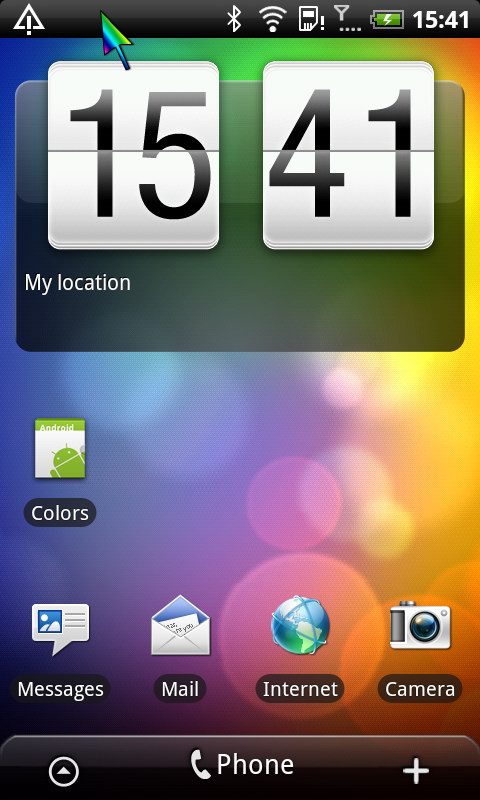 |
What is an overlay? The SDK defines them as: “Window type: system overlay windows, which need to be displayed on top of everything else. These windows must not take input focus, or they will interfere with the keyguard. ” So what we are about to do is have a small view created, make it show a cursor image, and move it around. Sample application |
|
Details Unless your AndroidManifest.xml contains the SYSTEM_ALERT_WINDOW permission, the code will fail:
 WindowManager.LayoutParams params = new WindowManager.LayoutParams(
    WindowManager.LayoutParams.WRAP_CONTENT,
    WindowManager.LayoutParams.WRAP_CONTENT,
    WindowManager.LayoutParams.TYPE_SYSTEM_OVERLAY,
    WindowManager.LayoutParams.FLAG_NOT_FOCUSABLE |
WindowManager.LayoutParams.FLAG_NOT_TOUCHABLE |
WindowManager.LayoutParams.FLAG_LAYOUT_IN_SCREEN,
PixelFormat.TRANSLUCENT);
To make the cursor be able to cover the status bar, and have it’s coordinates starting from screen’s (0,0) leftmost and topmost point, you will need to specify the .FLAG_LAYOUT_IN_SCREEN flag. |
 |
Hope this code proves useful. Looking forward to your comments, questions and feedback,
Customizing the system’s pointer
It is possible to detect the system mouse coordinates and draw a custom overlay on top of the system mouse cursor. This way we can increase the pointer image size, a very useful enhancement for those that have problems seeing the tiny default cursor. Here is a demo showing a bluetooth mouse cursor and our bigger custom mouse cursor overlay.
Demo #1
Demo #2
Demo app on Google play
Based on popular request, I finally developed a freeware application to customize the mouse cursor and provide a bigger cursor on Android OS, that runs on Android 4.0 or newer and doesn’t need root!. It’s named BigMouse and you can find it on Google Play here.
This app can be used both with Bluetooth Mouses and with wired mouses connected over OTG enabled USB.
Default HVGA? Can it change resolution?
??
set params.width in service’s onCreate()
change it to fit your needs
Thanks for a great article!
I’m glad this helps.
Great Article ! thanks
@Surbhi: you’re welcome. what are you working on?
Hello,
is it possible to ensure that the cursor is positioned at the location where the user touches the screen?
Thank you in advance
@Thomas, yes, it is possible, feel free to contact me for more details.
Is it possible generate a “tap screen” using this cursor?
Thanks!
@Rafy yes, it is possible, see: http://www.pocketmagic.net/2012/04/injecting-events-programatically-on-android
Just what I need! Thank you for this sample application. It really helps me a lot. I appreciate it so much. You don’t know how much it means to me 😀 Once again, thanks.
FYI, I’m creating application to control the mouse with camera for my thesis. Wish me luck 😀
@Michael: Good luck with your thesis. Would love to see your project . Did you have the chance to see the “HeadMouse” project? It is still available as open source.
@Radu: Thank you Radu. I’ll let you see as soon as it finishes 😀 Haven’t seen the project. Is it yours? Where can I see it? Thanks.
Is it possible to get the standard mouse cursor arrow position as in framework and using the overlaying to drawn new cursor over it. I cannot fine any means of getting the mouse coordinates (x,y)
@Graham, yes it is possible. I already did this for a client. Drop me a mail for more details.
Thanks Radu, We are trying to resolve a problem for disabled users to give them a bigger, brighter mouse arrow instead of the stock one which is difficult to see. I would appreciate more details as you have offered. Can you send to my email address, thanks.
Hi Radu, I have a question. How do I capture events from an IR remote and deliver them to the overlay?
Hello Radu,
Thanks for showing your work, it’s really great!
I’m trying to use it to have a remote touchpad app between android devices, and I have a problem. The cursor does not cover the whole screen, it dissapears on the right hand side. What’s strange is that it cover the complete height of the screen, the problem it’s just width-wise. Do you know why this could be happening? I have tried your project from the scratch and also have tried adapting it for my code; same result in both cases.
Thank you very much in advance!
@Ragunath: are you working for Math R.?
@Daniel: in my code find:
…
WindowManager.LayoutParams params = new WindowManager.LayoutParams(
WindowManager.LayoutParams.WRAP_CONTENT,
WindowManager.LayoutParams.WRAP_CONTENT,
WindowManager.LayoutParams.TYPE_SYSTEM_OVERLAY,
…
Change WRAP_CONTENT to MATCH_PARENT, or the number of pixels representing your Screen_width. How do you plan to inject the clicks?
@Radu: Thank you very much, it works! For the click injection I’m using your second method from http://www.pocketmagic.net/2012/04/injecting-events-programatically-on-android/ . I am working with a rooted device, so I can install the app with system signature, as a system app, and use the INJECT_EVENTS permission.
By the way, the cursor is not showing above the system bar, though I have the FLAG_LAYOUT_IN_SCREEN flag. These are the params I’m using:
WindowManager.LayoutParams params = new WindowManager.LayoutParams(
WindowManager.LayoutParams.MATCH_PARENT,
WindowManager.LayoutParams.MATCH_PARENT,
WindowManager.LayoutParams.TYPE_SYSTEM_ALERT,//TYPE_SYSTEM_ALERT,//TYPE_SYSTEM_OVERLAY,
WindowManager.LayoutParams.FLAG_NOT_FOCUSABLE | WindowManager.LayoutParams.FLAG_NOT_TOUCHABLE |
WindowManager.LayoutParams.FLAG_LAYOUT_IN_SCREEN //will cover status bar as well!!!
,PixelFormat.TRANSLUCENT);
Really nice work, keep it up!
@Daniel: double check my code. As you seen in the video, I have no problem in getting the cursor above the system bar.
@Radu: I’ve seen the video, but there’s no system bar in it. By system bar I’m refering to the bar that appears from ICS at the bottom of the screen, with the BACK, HOME and RECENT buttons. I can inject events there (click on those buttons), but no pointer is shown.
@Daniel, are you referring to a tablet? Better drop me a screen capture showing this issue. I didn’t have such an issue, and I recall testing the custom pointer on lock screen (the pull ring screen), on the notifications screen, titlebar, etc. But it is true I don’t remember testing on a tablet.
@Radu: sorry, for the delay, took the weekend off, hehehe. Yes, I’m referring to a tablet. Should we communicate through email better? To avoid filling the comments section. It would be easier to send you the image too.
Oh, by the way, I was trying to inject multitouch events, to simulate a pinch for instance, but although the events are injected (shown in developer mode), no pinch gesture is recognised by, for instance, Google Maps. Do you know why this could happen?
Thanks!
I succeeded with the multitouch injection. The key was to set the ‘pressure’ field from the PointCoords to 1. It seems that by default it is considered as 0, so no “touch” is computed after all.
Still working on the ‘cursor over system bar’ mission 😛
Buna Radu, mersi de solutie, as avea o intrebare, incercam sa trimitem un event de click din overlay catre android prin partea de software, ai ideie cum am putea asta fara a avea permisiune de root la sistem?
Mersi mult
Salut Ovidiu,
Citeste http://www.pocketmagic.net/2012/04/injecting-events-programatically-on-android/ si http://www.pocketmagic.net/2013/01/programmatically-injecting-events-on-android-part-2/
Fara root nu se poate. Ar putea exista alte alternative, dar depinde de ceea ce incerci sa faci. Asa ca poate vrei sa dai mai multe detalii.
Radu
Mersi de raspuns Radu! Ce am vrea sa facem e exact ce ai expus aici, o aplicatie software care sa simuleze un mouse pe ecran fara a avea conectat un mouse la exterior, mouse-ul fiind simulat pe ecran de aplicatie si controlat doar prin touch screen
Salut Ovidiu,
Poti folosi codul acesta sau cel pentru injectare de evenimente, gratuit, dar numai in aplicatii necomerciale.
Din pacate la partea de injectare ai nevoie de root.
Succes
I need to get the TYPE_SYSTEM_ALERT or similar overlay type that stay on top of all the other window and also gets the motion events. At the same time passes the motion events to any overlay under the top layer. Is it possible to do this? If so can you please point me to a good documentation or show me how to do this. Thanks in advance.
@Aruna yes it is possible, see the video at the bottom of this article.
Thanks for the reply. Is this just by getting the correct LayoutParams combination or does it need event injections as well. I’ve tried different LayoutParams combinations but failed to pass the events to the layers under the top layer as the top layer getting the focus.
@Aruna I sent you an email.
Hey Mr.Radu. The sample codes you provided seems have some problem with resolution. I assume the overlay width and height is define with params but change it does not affect the cursor reachable area. What I am doing is connect two device (with different resolution) and one device send the co-ordinates to update the position of cursor. However I am not sure why the cursor area is automatically set as client and limit the cursor reachable area (480*800, use to send co-ordinate. and server is 720 * 1280). Do you know what cause this happen and know the possible solutions?
Sincerely,Shawn
And I try connected two devices with (480*800 and 480*840 resolutions) the cursor reachable area at 480*840’s device is 480*800 also
I am sorry….it’s my own mistake…..I forgot I have set the update border to avoid cursor update to outside screen and forgot verfiy the algorthm. looks this is the problem. I’m Sorry for disturb.
can you share the mouse control the cursor overlay?
Pairs, flat above, the cursor is Xiabu Qu, there are better ways to adapt flat do, after all, the opportunity to use the mouse on the tablet will be some more
Hi.. can u please share the source code of your demo in the video showing the mouse
cursor being controlled via Bluetooth mouse… I would really love to build such a cool app as a project.
Thanks
Second demo video added, showing how to connect a bluetooth joystick from a wheel chair for persons with dissabilities, to an Android Phone and get a bigger mouse cursor.
Thank’s Good Article bro 😀
Hello, This article is nice. I have some questions about this project. Does device have to root ? or not? for touching with overlay. Thanks.
Based on popular request, I finally developed a freeware application to customize the mouse cursor and provide a bigger cursor on Android OS, that runs on Android 4.0 or newer and doesn’t need root!. You can find it on Google Play here.
This is really a good application! Do you have another version of it in which the on board trackpad of the phone will be used instead of mouse?
@Miguel,no, but you can hire me to make one.
Dear Motisan. Could you tell me how to get the coordinates of touch events and don’t interfere with keyguards at the same time? Really appreciate your help.
for getting the touch coordinates see the :Monitor: function of my event injection library presented here: http://www.pocketmagic.net/2013/01/programmatically-injecting-events-on-android-part-2/ . Alternatively , there is another simpler approach but I can’t release it publicly just yet.
:XD, it should be a serious security problem for android.
Thank you for your great works. Anyway, I have a question. How to get mouse cursor position on an overlay window to implement Bigmouse app? In my understanding, Overlay window cannot get mouse event because it is NOT touchable. Are there any thing wrong with my understanding? Your answer will be great help for me. Thank you~!
Hello KKwams,
Indeed I have developed a technique for getting the mouse events, as demonstrated in BigMouse. However I cannot release it publicly at this time. Should you have a commercial interest in this solution, feel free to email me directly.
I’ve send e-mail. Plz, check it. Thank you.
Hello Radu Motisan,
I have read all of your articles about event injection and cursor overlay. I want to inject event to another app that does not belong to me. I want to do it without root permission like BigMouse. Base on your articles, method 1 and method 2 cannot inject an event to another app; method 3 can, but need a rooted phone. So, how did you do in BigMouse? Please give me a guide to do this, or give me some key words to research. Thank you.
Hi Radu,
I want to create an android application, so that I can able use my android device as input device to my pc/laptop as keyboard and mouse via usb cable/LAN/wifi. Can you please guide me how to do this…..or where to start?
Thanks
Hi Radu,
i want to customise the cursor movement.They should be moved according to coordinate provided from my other laptop.I want to send coordinate from my laptop using TCP socket.can we do this??Do u have some sample code for click part that is if i click from mouse,it should click start,hide or stop.
@Daniel can u share ur code…how u have implemented click..
Hello, Radu
How can I track mouse position with no root like youtube video 1?
@Jake, hi ! Yes, it can be done.
@Radu Do I have to use JNI ? or Not?
Hi Radu,
I have seen your article Programmatically Injecting Events on Android part 1 and 2, it did help me a lot.
But now i am facing a problem is to pass touch event from one android tab to another one without root.
I know those 3 methods you mentioned need the root permission. But is there something new in android 4.4 so that we can do it without root??
I am also thinking that can we simulate a bluetooth mouse in android tab so that it can act as a bluetooth mouse to control another android tab to achieve the requirement..
Thanks a lot
I would love to use this, is there a way to get the app? It isn’t on google play anymore 🙁
I am a student from DLUT China. and my English is not so good but I hope you could understand me. I have studied this for a long time until I saw your paper. It really shocked me and this is really what I wanted. It’s a pity that I can’t download the demo on google play now. The problem is as most people said that how can I get the mouse moving event on the screen. I try to create a transparent View on the screen and inject the onHoverEvent so I can get the position of mouse. But because of this View, it injects all events,such as onClick, onTouch under it. I know you must use some special methods and I am so curious of this. I really hope you will e-mail me and thanks a lot! (My address: yimulinwei@gmail.com)
@Daniel, you can compile(not found any other word it) by downloading the code
BigMouse is not available on Google Play. Can it be emailed? I have a friend with a tablet that uses a mouse and the cursor is not large enough. PLEASE HELP. Please send response to my email. Thanks in advance.
The tool has been taken down from Google Play, because of the numerous negative votes it received: as a low level tool, it was impossible to work reliable on all Android devices, and the user community will penalize this.
Wow,, i am new to Android although.
but your tutorial helped a lot to do this way.
Thanks Radu.
Hi Guy,
to get a bigger mouse cursor (on TV screen android stick) it is clearly what i need. So, thank you that you did.
As it is is not possible on google play, would you so kind to send me tha apk file on email?
Thank you in advance,
Joe
Radu, Can you send bigmouse app by e-mail. Because it’s not available on Google play.
Thanks in advance.
Radu, can you please email me, i have a very important question about an app am working on (slabana7@gmail.com)
Thank you for such great tutorials!!
can you please tell me how you managed to simulate touch on screen as you click the mouse button…
thanks in advance!!!!
Can you send bigmouse app by e-mail. Because it’s not available on Google play.
Thanks in advance.
Is there a way to make it so the cursor goes where you touch?
@Lee yes, that’s also possible.
can you send me the bigmouse application via email. it’s not available in the play store.
Any chance you could send the apk by mail? 🙂
How can we hide the cursor of Bluetooth mouse?
I don’t think we can.
OK, Can we than use a unity game engine developed custom cursor?
@Rahu I’m afraid that unity won’t work either.
why in the fuck can you not just link to the apk for people that need to try this???? I will host the fuckin thing… it is tiny.
How I can place the cursor outside the application.I mean placing cursor in all the applications
Hello Kala, what is your target application? I mean what are you trying to do?
Thanks for your reply.I am controlling android phone through PC
Please give me a idea
Helo Radu, can you please email me the apk too? A lot of people are looking for your help on this. Greatly appreciated
Hey Nice Article. But I’m having a problem with the project you have provided when i change the min sdk and target sdk to 15 instead of 7(used in the project) then nothing happens in the app on start button and when i roll back the minSdk to 7 all works well then. Why this is happening btw i have removed two deprecated methods getHeight() and getWidth() but still not working on minSdk 15. Plz help.
Hey i was wondering if u could send the apk through email
Hi Rahu, in your demo #1 there are two mice, a smaller one (I assume it’s the system default drawn in framebuffer?) and a custom one. Is there a way to hide the small default cursor? Thanks!
unfortunately nothing I know of.