
PocketMagic

PocketMagic

Where Technology meets magic


Android
45 Posts
BlackBerry
4 Posts
Electronics
68 Posts
Hardware
120 Posts
High Voltage
49 Posts
iPhone
4 Posts
Linux
2 Posts
Nuclear
20 Posts
Optics
11 Posts
Photography
7 Posts
Photoshop
3 Posts
Research
19 Posts
Reviews
18 Posts
Robotics
8 Posts
Security
7 Posts
Software
73 Posts
Symbian
2 Posts
Tubes
18 Posts
Windows
3 Posts
Windows Mobile
11 Posts

Top Articles!       See PocketMagic on Facebook


uRADMonitor - Online Radiation monitoring station | 15006 Views | Rate 69.8
uRADMonitor - Online Radiation monitoring station
Bluetooth and iOS - Use Bluetooth in your iPhone apps | 18519 Views | Rate 59.36
Bluetooth and iOS - Use Bluetooth in your iPhone apps
NMEA GPS Library for AVR Microcontrollers | 4890 Views | Rate 55.57
NMEA GPS Library for AVR Microcontrollers
Programmatically Injecting Events on Android - Part 2 | 5144 Views | Rate 45.12
Programmatically Injecting Events on Android - Part 2
Building a robot – Part 2 | 4698 Views | Rate 44.32
Building a robot – Part 2
Simple Switched power Supplies | 16328 Views | Rate 42.08
Simple Switched power Supplies
Capacitor Discharge Microspot Welder / Cutter | 11465 Views | Rate 36.51
Capacitor Discharge Microspot Welder / Cutter
Atmega8 and Nokia 5110 LCD  | 1587 Views | Rate 34.5
Atmega8 and Nokia 5110 LCD


Reinstalling Vending.apk (Market) on Android


By Radu Motisan Posted on November 8th, 2010 , 3517 Views (Rate 3.79)


For some reason I am unable to find the Market app after the last ROM Upgrade (on rooted G1 Android ).

To fix this I needed the vending.apk file, which is the installer for the Android Market. You can find it easily over the Internet.

You can't install the Market app as a regular android apk (adb install vending.apk), instead you will need to copy it to /system/app on the device, and do a restart.
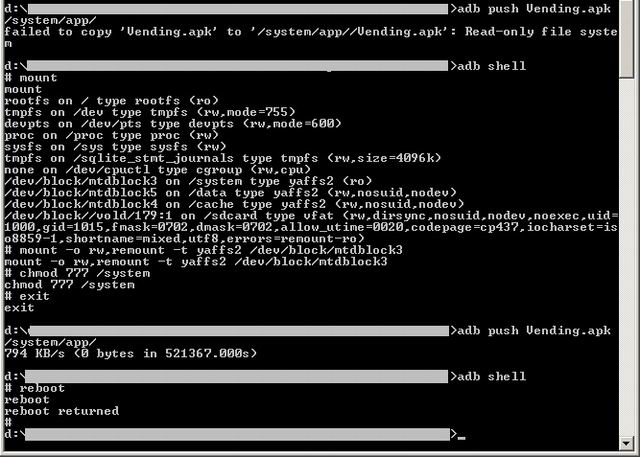
adb_market_vending.apk_reinstall_market_app_android
Step 1. Make the /system partition writable . See this article on how to remount, or do the following:
d:\>adb shell
# mount
(note: you will see a list of partitions, locate the /system one)
# mount -o rw,remount -t yaffs2 /dev/block/mtdblock3
(note: mtdblock3 is /system on my device)
# chmod 777 /system

Step 2. Copy the Vendink.apk
d:\>adb push vendink.apk /system/app/

Step 3. Reboot
d:\> adb shell
# reboot

It's easy. And here is the Market app back on my Android:
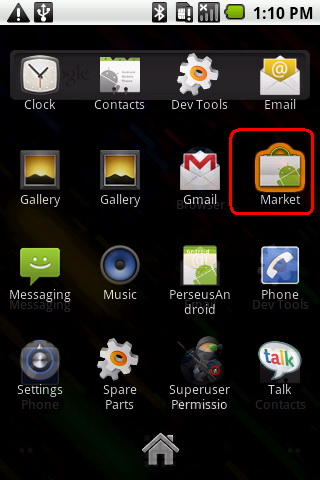
adb_market_vending.apk_reinstall_market_app_android_market


More on PocketMagic:

How to set the AVR Fusebits | 1766 Views | Rate 23.86
How to set the AVR Fusebits
ATMega128 and HD44780 LCD using 3 Wires with the 74HC164 | 2100 Views | Rate 22.83
ATMega128 and HD44780 LCD using 3 Wires with the 74HC164
Repairing a Victoreen CDV-700 6B Dosimeter  | 179 Views | Rate 22.38
Repairing a Victoreen CDV-700 6B Dosimeter
Dual H-Bridge for controlling two motors | 1258 Views | Rate 21.69
Dual H-Bridge for controlling two motors
USBAsp -  AVR USB Programmer  | 8206 Views | Rate 21.2
USBAsp - AVR USB Programmer
Developing for Blackberry 10 | 99 Views | Rate 19.8
Developing for Blackberry 10

7 Responses to “Reinstalling Vending.apk (Market) on Android”

  1. 1
    Luis V:

    im trying to follow ur steps on how to install market into the phone, but im lost, my problem is that i rooted my phone, then i used a rom to make it look kool but now my market is gone and so is rom manager which i need to change my roms. so i dont know what to do, im using the sprint htc hero, pls if u get this i can use some help. thx

  2. 2
    Radu Motisan:

    Hi Luis, Did you try my suggestion above?

  3. 3
    Roelf Renkema:

    If your rooted your phone just copy the darn apk.

  4. 4
    Dani:

    hey thanks for your time to make this!
    only i have question (im a noob, so bare with me) when i do -o rw,remount etc. command it responds with permision deniend!

    info
    -temprooted with visionary
    -bugybox installed

    what am i missing?
    thanks

  5. 5
    Chris Olstrom:

    Re: Dani

    It sounds like you don’t have root permissions. Try typing ‘su’ beforehand. Your prompt should look like ‘#’ if you have root, or ‘$’ if you do not.

  6. 6
    wahyudiansyah:

    http://download-apk.blogspot.com/2011/05/download-vendingapk-free.html

  7. 7
    Bogaz Uygulamaları:

    Thank you bro. It’s useful for me. I’m gonna use it with my Android phone.

Thank you for commenting. Your comment won't show until approved, which can take some time.

Please copy the string aMhyiW to the field below: