PocketMagic

PocketMagic

Where Technology meets magic


Android
45 Posts
BlackBerry
4 Posts
Electronics
68 Posts
Hardware
120 Posts
High Voltage
49 Posts
iPhone
4 Posts
Linux
2 Posts
Nuclear
20 Posts
Optics
11 Posts
Photography
7 Posts
Photoshop
3 Posts
Research
19 Posts
Reviews
18 Posts
Robotics
8 Posts
Security
7 Posts
Software
73 Posts
Symbian
2 Posts
Tubes
18 Posts
Windows
3 Posts
Windows Mobile
11 Posts

Top Articles!       See PocketMagic on Facebook


uRADMonitor - Online Radiation monitoring station | 14935 Views | Rate 70.12
uRADMonitor - Online Radiation monitoring station
Bluetooth and iOS - Use Bluetooth in your iPhone apps | 18212 Views | Rate 58.75
Bluetooth and iOS - Use Bluetooth in your iPhone apps
NMEA GPS Library for AVR Microcontrollers | 4835 Views | Rate 56.22
NMEA GPS Library for AVR Microcontrollers
Programmatically Injecting Events on Android - Part 2 | 5015 Views | Rate 44.78
Programmatically Injecting Events on Android - Part 2
Building a robot – Part 2 | 4619 Views | Rate 44.41
Building a robot – Part 2
Simple Switched power Supplies | 16159 Views | Rate 41.86
Simple Switched power Supplies
Capacitor Discharge Microspot Welder / Cutter | 11359 Views | Rate 36.41
Capacitor Discharge Microspot Welder / Cutter
Atmega8 and Nokia 5110 LCD  | 1548 Views | Rate 35.18
Atmega8 and Nokia 5110 LCD


Perseus 3 Advanced Robot (using Windows Mobile)


By Radu Motisan Posted on September 12th, 2009 , 1341 Views (Rate 0.99)


It's been a while since I've started my first experiments in Robotics. I needed a lot of time to build a usable platform, see the latest Ara platform.

The plan was to use a small mobile processing unit as the robot's brain, and finally I put everything together: the robot platform modified to 4x4 geared motor propulsion (very strong), the sensor unit, the bluetooth remote and motor controller board (all on a neat ATMega8 board that I've developed) and finally the brain, a low-power Smartphone i-mate SP5 with Camera (for artificial vision), microphone (for voice command), WLAN, bluetooth running Windows Mobile 6.

The workflow is as follows:
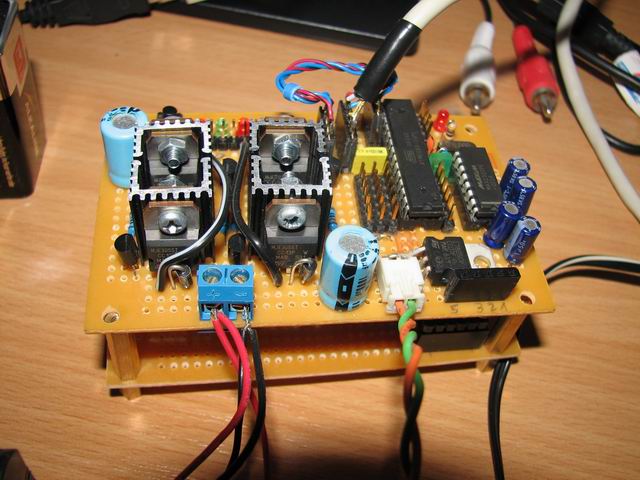
1) the Atmega8 board controls the motors (via a 10A H-Bridge), gathers data from sensors and interfaces a serial bluetooth module:
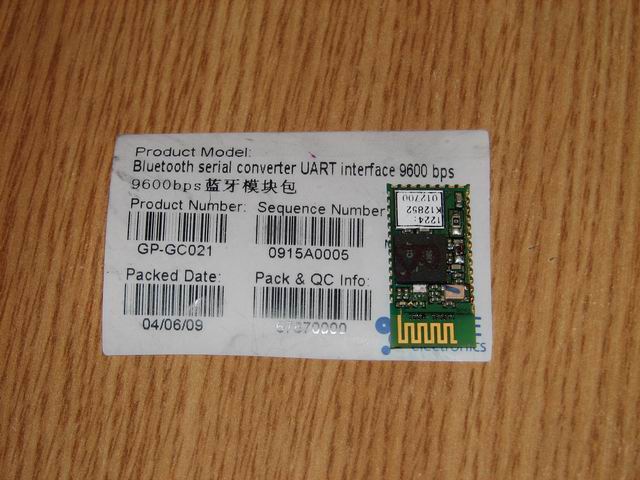
2) The smartphone is the robot's brain. It interfaces the Atmega8 via bluetooth, and based on camera input, and remote sensors decides the motor control. Alternatively voice commands can be used for various purposes.
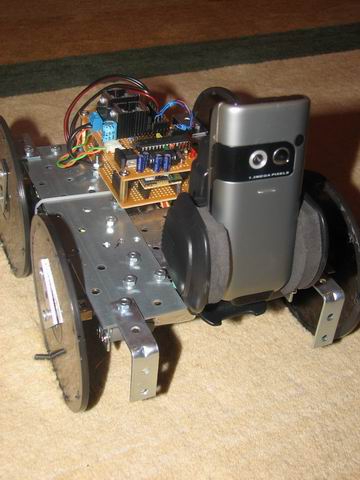
Since the brain software is not ready I've connected everything together for a few tests.
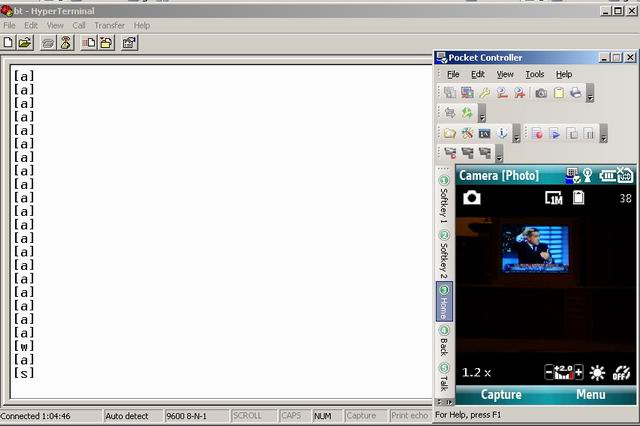
I've linked my PC to the Atmega8 board via bluetooth, and I've connected the Smartphone via WLAN to my computer's network, so I could receive images from the camera. So from my computer I could move the robot around and see the Camera images.
Here's a snapshot with the Hyperterminal for robot control (keys: awsd) and the camera content:
From this point the hardware is almost done. The robot including the smartphone and the batteries weights ~3kg. For the software it will be a long journey but eventually the intermediate results will be posted here. Windows Mobile is quite an Advanced OS offering powerful tools for developers.

Other things to see:
- My Voice command Master dissertation thesis.
- Various Robot platforms that I've built, here and here
- My micro-controller experiments
- atmega8 with bluetooth capabilities

Cheers!
Radu Motisan


More on PocketMagic:

Tube: USN-5J29 | 365 Views | Rate 26.07
Tube: USN-5J29
Atmega8 and enc28J60 for ethernet support | 7295 Views | Rate 24.65
Atmega8 and enc28J60 for ethernet support
How to set the AVR Fusebits | 1717 Views | Rate 23.85
How to set the AVR Fusebits
ATMega128 and HD44780 LCD using 3 Wires with the 74HC164 | 2058 Views | Rate 22.87
ATMega128 and HD44780 LCD using 3 Wires with the 74HC164
Dual H-Bridge for controlling two motors | 1202 Views | Rate 21.46
Dual H-Bridge for controlling two motors
USBAsp -  AVR USB Programmer  | 8105 Views | Rate 21.05
USBAsp - AVR USB Programmer

6 Responses to “Perseus 3 Advanced Robot (using Windows Mobile)”

  1. 1
    PocketMagic » Atmega8 with Bluetooth radio module:

    [...] See my bluetooth enabled Atmega8 as used in my latest robot, Perseus 3. [...]

  2. 2
    PocketMagic » Android controlled robot (via Bluetooth) – Part 1:

    [...] an Android phone for this purpose is no exception. I will use it to control the Perseus 3 robot platform. What I'm doing is directly interfacing the Android with the ATMega microcontroller via the serial [...]

  3. 3
    Kariuki:

    Finally, i found my fifth year project. I think i pretty much know how to use the atmega8 for data acquisation using PC. How can i connect the atmega8 to transmit via bluetooth to an android phone without using a PC.

  4. 4
    ashish:

    hiiii we r working on a project to control bot via bluetooth so suggest me which module i shud use and also where to downlod perseus cuz i din found it in android market….i am using android 2.2

  5. 5
    Radu Motisan:

    Hi, you can find it here: http://www.pocketmagic.net/?p=1398

  6. 6
    HASAN:

    great work man, go ahead and i hope you more success.

Thank you for commenting. Your comment won't show until approved, which can take some time.

Please copy the string AbvKka to the field below: