
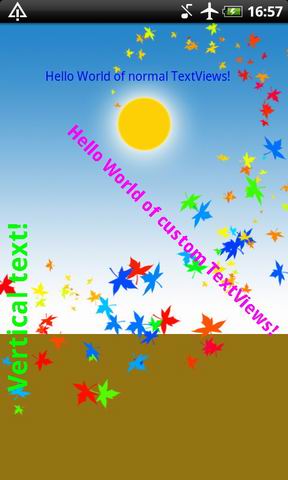
It is easy to derive the View class and create a custom Textview that can support custom text angles, including vertical text!
|
class CustomTextView extends View {
...
@Override
	protected void onDraw(Canvas canvas) {
		Paint paint = new Paint();
		paint.setTypeface(m_tTypeface);
		paint.setStyle(Paint.Style.FILL);
		paint.setColor(m_nColor);
		//paint.setShadowLayer(1, 0, 1, Color.parseColor("#000000"));
		paint.setTextSize(m_nSize);
		canvas.rotate(m_nRotationAngle,m_nRotationW,m_nRotationH);
		canvas.drawText(m_szText, 0, 0, paint);
		super.onDraw(canvas);
	}
...
The resulting CustomTextView Class can be used as simple as a normal TextView class:
CustomTextView tv3 = new CustomTextView(this);
//etc.
See the left pic to understand the potential of this technique. |
You need to be careful when selecting the rotation center, as it can put your text off-screen:
tv3.SetRotation(-90,120,90); //angle and rotation center
The first argument is the angle, it is in degrees, it takes negative values as well ( -90 = 270 , if you imagine the trigonometric circle). The other two parameters are the rotation center (x,y) coordinates.
Here’s the complete code:
CustomAngleText
Thank u very much! Save me much time to create on my own.
how to assign the resulted custom view in my already defined layout
Hello
Thanks for your golden posting…
I am building textview that user can rotate text using his/her two figures.
To solve, I used your code.
But it is not resized according to rotated text size….
So after rotating, text is croped by old textview size.
How to solve that?
I sent you my code.
public class AngledTextView extends TextView {
private short mAngle;
public AngledTextView(Context context, AttributeSet attrs) {
super(context, attrs);
mAngle = 0;
}
public void setAngle(short angle) {
mAngle = (short) Math.max(0, Math.min(360, angle));
this.invalidate();
}
@Override
protected void onDraw(Canvas canvas) {
Paint paint = new Paint();
paint.setTypeface(this.getTypeface());
paint.setStyle(Paint.Style.FILL);
paint.setTextSize(this.getTextSize());
canvas.rotate(mAngle, this.getWidth()/2, this.getHeight()/2);
canvas.drawText(this.getText().toString(), 0, 0, paint);
super.onDraw(canvas);
}
}
What’s wrong?…..