

EDIT Nov-2010 There is an easier way to compile native C code, see this article.
A recent project I’ve been working on required Bluetooth programming on the Android.
Having a quick look over the latest 1.5 Android SDK, I could see that bluetooth support was missing. Later research pointed out that Google expressively excluded Bluetooth APIs blaming lack of time.
On the other hand, I’m not a big Java fan, to say the least. I find Java unfriendly, and I don’t like the look and feel of Java apps. Sorry, I prefer C/C++ since it provides better control and flexibility. So it’s time to start doing C/C++ native applications for the Google Android.
How run a C program on Google Android?
First thing I’ll show here, is to compile a simple C program for the Android.
 |
|
Save this program as test.c. In the next steps we’ll be compiling this sample for the Google Android using gcc.
The tools
1. Download ubuntu linux. I currently use Desktop edition 9.04 in a virtual machine.
Attention: You’ll need to install Ubuntu on a machine with at least 1.5GB Ram, 10GB ext2 partition and 2GB Swap partition or you won’t be able to use this tutorial’s info (less then the minimum requirements will result in the impossibility of compiling the Android Code and we need that for the libraries).
2. Once Ubuntu is installed, download the Android Source code. On your linux box install additional packages:
$ sudo apt-get install git-core gnupg sun-java5-jdk flex bison gperf libsdl-dev libesd0-dev libwxgtk2.6-dev build-essential zip curl libncurses5-dev zlib1g-dev

$ sudo apt-get install valgrind
This one is only for Ubuntu Intrepid users:
$ sudo apt-get install lib32readline5-dev
3. Install Repo
Create a ~/bin directory in your home directory, and check to be sure that this bin directory is in your path:
$ cd ~

$ mkdir bin

$ echo $PATH
To add it to the Path, you can use:
$ PATH=$PATH:~/bin/
Download the repo script and make sure it is executable:
$ curl http://android.git.kernel.org/repo >~/bin/repo

$ chmod a+x ~/bin/repo
4. Initializing a Repo client
Create an empty directory to hold your working files:
$ mkdir mydroid

$ cd mydroid
Run repo init to bring down the latest version of Repo with all its most recent bug fixes. You must specify a URL for the manifest:
$ repo init -u git://android.git.kernel.org/platform/manifest.git

$ repo init -u git://android.git.kernel.org/platform/manifest.git -b cupcake
When prompted, configure Repo with your real name and email address. If you plan to submit code, use an email address that is associated with a Google account.
A successful initialization will end with a message such as
repo initialized in /mydroid
Your client directory should now contain a .repo directory where files such as the manifest will be kept.
5. Getting the files
To pull down files to your working directory from the repositories as specified in the default manifest, run
$ repo sync
For more about repo sync and other Repo commands, see Using Repo and Git.
The Android source files will be located in your working directory under their project names.
6.Verifying Git Tags
Load the following public key into your GnuPG key database. The key is used to sign annotated tags that represent releases.
$ gpg --import
then paste the key(s) below, and press Control-D to end the input and process the keys.
key 9AB10E78: "The Android Open Source Project <initial-contribution@android.com>"

-----BEGIN PGP PUBLIC KEY BLOCK-----

Version: GnuPG v1.4.2.2 (GNU/Linux)
mQGiBEnnWD4RBACt9/h4v9xnnGDou13y3dvOx6/t43LPPIxeJ8eX9WB+8LLuROSV
lFhpHawsVAcFlmi7f7jdSRF+OvtZL9ShPKdLfwBJMNkU66/TZmPewS4m782ndtw7
8tR1cXb197Ob8kOfQB3A9yk2XZ4ei4ZC3i6wVdqHLRxABdncwu5hOF9KXwCgkxMD
u4PVgChaAJzTYJ1EG+UYBIUEAJmfearb0qRAN7dEoff0FeXsEaUA6U90sEoVks0Z
wNj96SA8BL+a1OoEUUfpMhiHyLuQSftxisJxTh+2QclzDviDyaTrkANjdYY7p2cq
/HMdOY7LJlHaqtXmZxXjjtw5Uc2QG8UY8aziU3IE9nTjSwCXeJnuyvoizl9/I1S5
jU5SA/9WwIps4SC84ielIXiGWEqq6i6/sk4I9q1YemZF2XVVKnmI1F4iCMtNKsR4
MGSa1gA8s4iQbsKNWPgp7M3a51JCVCu6l/8zTpA+uUGapw4tWCp4o0dpIvDPBEa9
b/aF/ygcR8mh5hgUfpF9IpXdknOsbKCvM9lSSfRciETykZc4wrRCVGhlIEFuZHJv
aWQgT3BlbiBTb3VyY2UgUHJvamVjdCA8aW5pdGlhbC1jb250cmlidXRpb25AYW5k
cm9pZC5jb20+iGAEExECACAFAknnWD4CGwMGCwkIBwMCBBUCCAMEFgIDAQIeAQIX
gAAKCRDorT+BmrEOeNr+AJ42Xy6tEW7r3KzrJxnRX8mij9z8tgCdFfQYiHpYngkI
2t09Ed+9Bm4gmEO5Ag0ESedYRBAIAKVW1JcMBWvV/0Bo9WiByJ9WJ5swMN36/vAl
QN4mWRhfzDOk/Rosdb0csAO/l8Kz0gKQPOfObtyYjvI8JMC3rmi+LIvSUT9806Up
hisyEmmHv6U8gUb/xHLIanXGxwhYzjgeuAXVCsv+EvoPIHbY4L/KvP5x+oCJIDbk
C2b1TvVk9PryzmE4BPIQL/NtgR1oLWm/uWR9zRUFtBnE411aMAN3qnAHBBMZzKMX
LWBGWE0znfRrnczI5p49i2YZJAjyX1P2WzmScK49CV82dzLo71MnrF6fj+Udtb5+
OgTg7Cow+8PRaTkJEW5Y2JIZpnRUq0CYxAmHYX79EMKHDSThf/8AAwUIAJPWsB/M
pK+KMs/s3r6nJrnYLTfdZhtmQXimpoDMJg1zxmL8UfNUKiQZ6esoAWtDgpqt7Y7s
KZ8laHRARonte394hidZzM5nb6hQvpPjt2OlPRsyqVxw4c/KsjADtAuKW9/d8phb
N8bTyOJo856qg4oOEzKG9eeF7oaZTYBy33BTL0408sEBxiMior6b8LrZrAhkqDjA
vUXRwm/fFKgpsOysxC6xi553CxBUCH2omNV6Ka1LNMwzSp9ILz8jEGqmUtkBszwo
G1S8fXgE0Lq3cdDM/GJ4QXP/p6LiwNF99faDMTV3+2SAOGvytOX6KjKVzKOSsfJQ
hN0DlsIw8hqJc0WISQQYEQIACQUCSedYRAIbDAAKCRDorT+BmrEOeCUOAJ9qmR0l
EXzeoxcdoafxqf6gZlJZlACgkWF7wi2YLW3Oa+jv2QSTlrx4KLM=
=Wi5D
—–END PGP PUBLIC KEY BLOCK—–
After importing the keys, you can verify any tag with
$ git tag -v tagname
7. Building the code
The Android code contains a bug that hasn’t been solved up to the date of this article.
So before you start compiling the code, you’ll need a few modifications, or the build will fail (after consuming some of your time and patience). The error is:
external/qemu/sockets.c: In function 'sock_address_init_resolve':

external/qemu/sockets.c:637: error: 'EAI_NODATA' undeclared (first use

in this function)

external/qemu/sockets.c:637: error: (Each undeclared identifier is

reported only once

external/qemu/sockets.c:637: error: for each function it appears in.)

make: *** [out/host/linux-x86/obj/EXECUTABLES/emulator_intermediates/

sockets.o] Error 1
To fix this, before compiling the android code, open ~/mydroid/external/qemu/sockets.c and add
#define __USE_GNU
just before the #include <netdb.h>
Now you can build the files. Run make from within your working directory:
$ cd ~/mydroid

$ make
On my virtual machine running ubuntu, the build process took several hours. The host PC is a 2.6GHz P4.
Compile test.c with gcc for the Android platform
Android uses a simplified version of libc, called bionic. We need to compile using Android’s prebuilt cross-compiler arm-eabi-gcc, and use the bionic library on the phone.
The easy way to do this is to use the agcc perl wrapper. You can download the original file here, and modify
my $TOOLCHAIN = "$DROID/prebuilt/linux-x86/toolchain/arm-eabi-4.2.1";
to
my $TOOLCHAIN = "$DROID/prebuilt/linux-x86/toolchain/arm-eabi-4.3.1";
Or download this updated version directly.
Copy agcc to your home directory, and chmod it:
chmod +x agcc
then set the PATH to the bionic libs and the agcc location:
$ PATH=$PATH:~/mydroid/prebuilt/linux-x86/toolchain/arm-eabi-4.3.1/bin:~/:~/mydroid/
Now you can compile the test.c file:
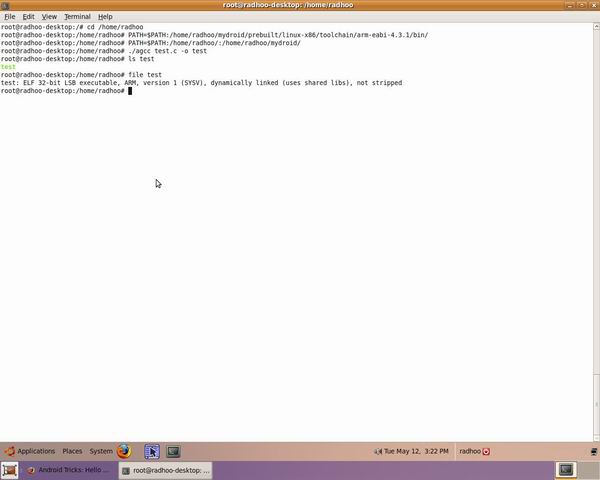
agcc test.c -o test
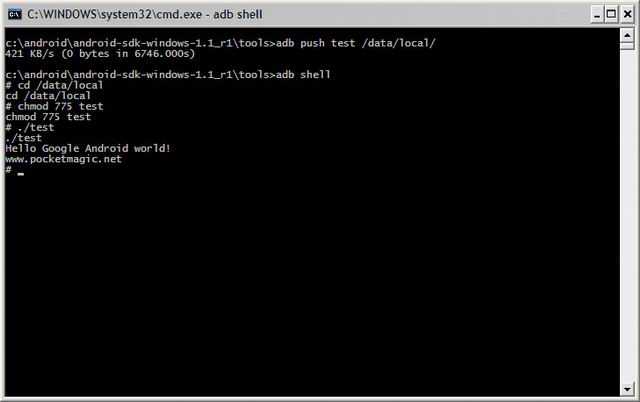
Take the resulting test binary and upload it to your android using:
adb push test /data/local/test
Then run it:
adb shell

chmod 775 test

./test
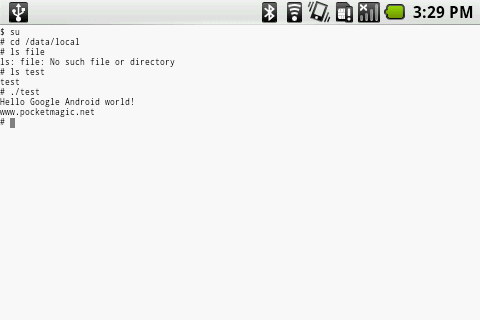
See the pics for more details:
 |
 |
 |
Next thing to do is to try to control the bluetooth functionality using native C code and the android toolchain.
More on native C apps for Android here.
Part of this article contains information presented by Google on http://source.android.com/download
Best regards,
Radu Motisan


Great. Thanks for the instructions.
Any idea how start your C program when the system boots up, or after it boots up?
Hi
when i run the following on my Ubuntu 9.04:
$ sudo apt-get install lib32readline5-dev
I am getting the following error:
E: Couldn’t find package lib32readline5-dev
how did u resolve this?
That’s only for ubuntu intrepid users.
You won’t need it in 9.04 desktop.
I’ve modified the post to reflect this as well.
Hi,
Thanks for the instructions.
Just a little modification, you need to change agcc, as the toolchain is not correct libgcc.a is not anymore in interwork folder, so 2 lines needs to be changed too.
“$TOOLCHAIN/lib/gcc/arm-eabi/4.3.1/libgcc.a”, on line 117 and 132
Thanks
Great. works like a charm.
@Dorian: thanks for the correction.
Hi,
I have the environment for building a C code for android 1.0 in the ubuntu machine. Now I have downloaded Android 1.5 SDK for linux and want to compile the same C code for Android 1.5. What changes I have to make ?
Hi,
I am using android X86 (taken on 10 oct ’09).
I get: adb: not found
Then. I’ve mounted the resulted system.img, copied explicit the *hello in
/system/bin and data/, then I’ve build the iso and boot it up.
I can see my hello, but.
#./hello
hello: not found
#hello
hello: not found
#adb
adb not found
The shell is dumb or….
hi marius,
what output do you get from ls -l
?
also, what do you mean by “then I’ve build the iso and boot it up.”
Pingback: To build the environment for developing Android for freerunner | allenc.tw
I did exactly the same as mentioned here but keep on getting the following error:
“/mydroid/out/target/product/generic/obj/lib/crtbegin_dynamic.o: In function `_start’:
bionic/libc/arch-arm/bionic/crtbegin_dynamic.S:(.text+0x14): undefined reference to `main’
collect2: ld returned 1 exit status”
Any idea how to resolve it?
Thanks in Advance.
Make sure you’ve put the following folders in the path:
$DROID/prebuilt/linux-x86/toolchain/arm-eabi-4.2.1
$DROID/prebuilt/linux-x86/toolchain/arm-eabi-4.3.1
The both folders are in the path but I am still getting the same error. It was working well few months back but now when I tried again I am getting the above error.
Hey, that’s really great! Just checked it out and it worked … now I can port all my ancient C programms to android lol
Hey there Tayefeh, funny to see that isn’t it?
The truth is you can make sore very powerful apps using the JNI.
I’ve implemented a complete bluetooth l2cap interface for Java using it. Will post more soon.
I like the idea, cool!
Very nice explanation! you saved my time. All in one place solution! Thanks!
I’m glad you like it. Make sure you read about JNI as well: it provides some more options.
One more thing – I’m trying to run a sample ‘hello world’ program using a .cpp file instead of .c file. Compiler complains of not finding iostream.h. Could you tell me how to use your script to call a c++ file?
Thanks for taking the time to provide this information 😉 It’s most helpful
You’re welcome, a .
Can you write the same agcc script for mips based system?
May I ask, what MIPS android hardware do you have?
I have MIPS Malta board with MIPSr2
I already have android running on it but my 3rd party software which is generally used in glic environment will not work under bionic based android. So I was wondering can we make such wrapper for mips based systems.
-Kaushik
Can,t install additional packages of android in ubuntu 10.4
Hi Radu! Nice guide, but i have a problem with the agcc compiler:
~$ agcc helloword.c -o helloword
arm-eabi-gcc: /home/tanisdlj/mydroid/prebuilt/linux-x86/toolchain/arm-eabi-4.3.1/lib/gcc/arm-eabi/4.2.1/interwork/libgcc.a: No such file or directory
This is my PATH:
tanisdlj@tanisdlj-andev:~$ echo $PATH
/usr/local/sbin:/usr/local/bin:/usr/sbin:/usr/bin:/sbin:/bin:/usr/games:/home/tanisdlj/bin/:/home/tanisdlj/mydroid/prebuilt/linux-x86/toolchain/arm-eabi-4.3.1/bin:/home/tanisdlj/:/home/tanisdlj/mydroid/
I follow your guide step by step, but i have this problem. Any suggestion? >.<
Hi Radu
I followed all the steps and in the final step
agcc hello.c -o hello I get this error
/localhome/user/bin/mipsandroid/prebuilt/linux-x86/toolchain/arm-eabi-4.3.1/bin/../lib/gcc/arm-eabi/4.3.1/../../../../arm-eabi/bin/ld: /localhome/user/bin/mipsandroid/out/target/product/generic/obj/lib/crtbegin_dynamic.o: Relocations in generic ELF (EM: 8)
/localhome/user/bin/mipsandroid/prebuilt/linux-x86/toolchain/arm-eabi-4.3.1/bin/../lib/gcc/arm-eabi/4.3.1/../../../../arm-eabi/bin/ld: /localhome/user/bin/mipsandroid/out/target/product/generic/obj/lib/crtbegin_dynamic.o: Relocations in generic ELF (EM: 8)
/localhome/user/bin/mipsandroid/out/target/product/generic/obj/lib/crtbegin_dynamic.o: could not read symbols: File in wrong format
collect2: ld returned 1 exit status
I have set the PATH too correctly. Kindly please help me.
/localhome/user/bin/mipsandroid/prebuilt/linux-x86/toolchain/arm-eabi-4.3.1/bin/../lib/gcc/arm-eabi/4.3.1/../../../../arm-eabi/bin/ld: /localhome/user/bin/mipsandroid/out/target/product/generic/obj/lib/crtbegin_dynamic.o: Relocations in generic ELF (EM: 8 )
/localhome/user/bin/mipsandroid/prebuilt/linux-x86/toolchain/arm-eabi-4.3.1/bin/../lib/gcc/arm-eabi/4.3.1/../../../../arm-eabi/bin/ld: /localhome/user/bin/mipsandroid/out/target/product/generic/obj/lib/crtbegin_dynamic.o: Relocations in generic ELF (EM: 8 )
/localhome/user/bin/mipsandroid/out/target/product/generic/obj/lib/crtbegin_dynamic.o: could not read symbols: File in wrong format
collect2: ld returned 1 exit status
sabin
I installed in ubuntu 10.04 and now I can compile c files for android donut 1.6
if you want I can explain
I compiled a test.c for and run on adb shell but how to run on my android phone?(DSTL1)
hello , please do, I think that will help the community.
mavci, you can use the terminal application for android.
thanks Radu!
I will write all explainations tomorrow.
Ok, then I can add them to this post, so others can use it too.
this is so dope. I can compile all kinds of console programs now!
Dude, you rock!
@Tanis: you mixed-up your EABI versions in your PATH; there are references to 4.2.1 and 4.3.1
glad you like it, Quincy .
Can’t seem to get the gpg –import section to work. How exactly do you paste the key in?
This tutorial is cool, but I have problems when I try to compile static
when I add -static directive I get error: “cannot find -lc” “collect2: ld returned 1 exit status”
do you know how to solve this problem? Thanks
regards
Gcc 4.3 is required for building android. 4.4 has strict has more strict rules so it will through fprintf declaraion errors..
To fix,
$ sudo apt-get install gcc-4.3 g++-4.3
$ sudo rm /usr/bin gcc
$ sudo rm /usr/bin g++
$ sudo ln -s gcc-4.3 gcc
$ sudo ln -s g++-4.3 g++
Hello Anup, Thanks for your contribution!
I am not at all a technical person, so when it comes to understanding code, this feels foreign to me. However, from what I’ve read, you’ve found a way to include blue tooth functionality with C++? That’s actually kind of cool in my opinion. If you don’t have bluetooth, you make it yourself.
Pingback: android trickery exploit for root
See this NDK/JNI tutorial as well:
http://www.pocketmagic.net/?p=1332
Hi, Thanks for the great tutorial, it worked like a charm. I’m having trouble using GDB. I want to know the loaction of the system and exit call addresses, using the command “p system”. GDB keeps giving me an error “no symbol table”. I’ve gave GDB the correct paths before attching to the process and used the “shared” command. I’m really struggling, Has anyone got any clue to why this is happening.
Slightly off-topic, but not really. You talked about implementing a bluetooth L2CAP interface for Java. I have done something similar and am trying to open a L2CAP socket to listen for incoming connections. But when I try to bind to a native L2CAP socket using JNI, I get error code 13 (permission denied) returned to me. When I try the same thing using RFCOMM, it is successful.
I’m interested in your interface that you wrote and I’m curious if it behaves the same.
Hi Greg, yes I’ve used JNI (and some other attempts) to open a L2CAP server socket and it failed on most of the Firmware versions.
However it works on older Android OS versions (< 1.5), also on newer versions depending on the channel you want to open. What do you mean by "I try the same thing using RFCOMM"?
I noticed that the Android API has support for L2CAP (all the way down to the native code), but it all marked private. So I attempted to access the private stuff via reflection and it works great for opening up L2CAP sockets to other devices. But when trying to open a server socket, it fails. I was thinking maybe I was doing something wrong, so I used the same technique for opening an RFCOMM server socket (basically use TYPE_RFCOMM instead of TYPE_L2CAP). I realize that the public API has support for this, but I was trying to prove that using the reflection technique also works, and it does.
So my conclusion was that L2CAP server sockets must not be supported. And your findings seem to support that theory. Have you investigated any further to figure out where the permission problem is coming from? Do you think this was a bug introduced in 1.5? Or is it an intentional security feature? I’m trying to open up L2CAP server sockets on psm 0x11 and 0x13.
Hi Greg, I’m not sure about that. Can you post the code as you did the reflection approach for accessing the private l2cap methods? I would give it a run on my side too.
Also I need to ask, if you open two PSM sockets with L2CAP, how can you do the same with RFCOMM? Does it work for you?
When I say RFCOMM works, I meant that creating the RFCOMM server socket and calling bindListen() on it (all via reflection of course) returns error code 0. I didn’t actually service any incoming connections, but I’m assuming the socket was open and listening. However calling bindListen() on an L2CAP server socket returns error code 13. Same code, just a different type constant passed into the BluetoothServerSocket constructor. I don’t have access to my code right now, but I will post it as soon as I can!
Here is my code. Not sure how well this will copy into the browser. Should be pretty easy to follow, just invoke the public static method. Let me know how it works!
public class BluetoothFactory { public static BluetoothServerSocket createL2CAPBluetoothServerSocket(int psm) { return createBluetoothServerSocket(3 /*TYPE_L2CAP*/, false, false, psm); } private static BluetoothServerSocket createBluetoothServerSocket(int type, boolean auth, boolean encrypt, int port) { try { Constructor constructor = BluetoothServerSocket.class.getDeclaredConstructor(int.class, boolean.class, boolean.class, int.class); constructor.setAccessible(true); BluetoothServerSocket serverSocket = constructor.newInstance(type, auth, encrypt, port); bindListen(serverSocket); return serverSocket; } catch (Exception e) { throw new RuntimeException("unable to create BluetoothServerSocket", e); } } private static void bindListen(BluetoothServerSocket serverSocket) throws SecurityException, IllegalArgumentException, NoSuchFieldException, IllegalAccessException, NoSuchMethodException, InvocationTargetException { BluetoothSocket socket = getSocket(serverSocket); Method bindListenMethod = BluetoothSocket.class.getDeclaredMethod("bindListen"); bindListenMethod.setAccessible(true); int errno = ((Integer)bindListenMethod.invoke(socket)).intValue(); if (errno != 0) { try { serverSocket.close(); } catch(IOException e) {} throwErrnoNative(socket, errno); } } private static BluetoothSocket getSocket(BluetoothServerSocket serverSocket) throws SecurityException, NoSuchFieldException, IllegalArgumentException, IllegalAccessException { Field mSocketField = BluetoothServerSocket.class.getDeclaredField("mSocket"); mSocketField.setAccessible(true); return (BluetoothSocket)mSocketField.get(serverSocket); } private static void throwErrnoNative(BluetoothSocket socket, int errno) throws SecurityException, NoSuchMethodException, IllegalArgumentException, IllegalAccessException, InvocationTargetException { Method throwErrnoNativeMethod = BluetoothSocket.class.getDeclaredMethod("throwErrnoNative", int.class); throwErrnoNativeMethod.setAccessible(true); throwErrnoNativeMethod.invoke(socket, errno); } }I’ve reformatted the code using the <.pre lang="java"> tag. I will try this code soon, please give me some time.
Hope there is a simple solution.
Hi Radi,
Nice Post.
I have written a small program that retrieves the time from a daytime server (time.nist.gov).
Thru adb shell it runs fine.
I need a mechanism to execute it without the use of adb, preferably directly on the device.
Cheers,
Earlence
hi Earlence.
To execute a native executable, do the following:
// android.os.Exec is not included in android.jar so we need to use reflection.
    Class execClass = Class.forName("android.os.Exec");
    Method createSubprocess = execClass.getMethod("createSubprocess",
            String.class, String.class, String.class, int[].class);
    Method waitFor = execClass.getMethod("waitFor", int.class);

    // Executes the command.
    // NOTE: createSubprocess() is asynchronous.
    int[] pid = new int[1];
    FileDescriptor fd = (FileDescriptor)createSubprocess.invoke(
            null, "/system/bin/ls", "/sdcard", null, pid);
Instead of /system/bin/ls use your Own path to your executable.
The second string (/sdcard) is a parameter you can send to your executable. For mre info read about android.os.Exec and createSubprocess.
To read the response of your native executable, you can do something like:
FileInputStream in = new FileInputStream(fd);
    BufferedReader reader = new BufferedReader(new InputStreamReader(in));
    String output = "";
    try {
        String line;
        while ((line = reader.readLine()) != null) {
            output += line + "\n";
        }
    } catch (IOException e) {
        // It seems IOException is thrown when it reaches EOF.
    }

    // Waits for the command to finish.
    waitFor.invoke(null, pid[0]);
That’s it. Credits go to http://gimite.net/en/index.php?Run%20native%20executable%20in%20Android%20App
Thanks!
Im getting a class not found exception. how can I get rid of that problem?
please post the complete error details, including the line where you get the error.
Class execClass = Class.forName(“android.os.Exec”);
Cannot find class “Exec”.
If I put an empty stub (android.os.Exec) – This allows proper compilation and linking, but at runtime, android prevents loading of android.os.* classes which are not in the public SDK. that solves the problem, but then an error comes up on line
Method createSubprocess = execClass.getMethod(“createSubprocess”,
String.class, String.class, String.class, int[].class);
Surely, this is not the correct technique to get rid of the error.
What are your suggestions?
Cheers,
Earlence
Does anyone know of a tablet running 2.2 or is flash capable?
Hi Greg,
I now have some time to look over this, looking at the code I see it uses reflection to use the access the private BluetoothServer socket methods.
To save time, could you post the BluetoothClient socket part as well? I would like to run a quick test on my android.
Greg,
Hey Radu, thanks for giving my code a try.
Is there more to the stack trace? A caused by perhaps? You’ll notice that when I throw the runtime exception, I am wrapping another exception. I’m curious what exeception that is. I’m assuming it’s going to be permission denied error, but I just want to make sure.
-Greg
yes, it seems to be a permission issue:
any idea how to overcome this?
complete trace:
( on g1 with android 2.1)
I was hoping you would know! 🙂
Your stack trace is different from mine and shows that you are failing in a different place. You are failing in initSocketNative(). On my device, initSocketNative() succeeds. But the later call to bindListenNative() fails with permission denied. Perhaps this is just a difference in devices. Are you testing on an HTC device by any chance? I know HTC has some differences in bluetooth. I am testing on a Moto Droid.
yes, I’m testing on a G1 . I’ll try to look over the native code, maybe there’s a clue on what goes wrong
Interesting. Your complete stack trace matches mine exactly, but the partial one didn’t. That’s strange that it’s different now. Ok, so we fail in the same place. At least we are consistent! Now to figure out why bindListenNative() returns the permission denied error.
Actually that was my mistake, for the first trace , the test app did not have the bluetooth permissions in the AndroidManifest.XML file. So I corrected that, and the second trace is ok.
Greg, please do a few tests on your side:
try to open a different port, other than 0x11 or 0x13
-if this works then-
find /system/lib/bluez-plugin/input.so on your Android device, and rename it to something else. Reboot and try opening 0x11 or 0x13 again. Does this work?
I tried ports 0x1 and 0x2. Neither worked, same permission denied error. I also renamed input.so to input.so.bak and tried again on port 0x11, permission denied. I rebooted and tried again, same error.
Pingback: PocketMagic » Android C native development using the NDK under Windows
This tutorial is cool, but I have problems when I try to compile static when I add -static directive I get error: “cannot find -lc” “collect2: ld returned 1 exit status”do you know how to solve this problem? Thanks
This tutorial rocks! Thank you for posting this kind of stuff 🙂
Ubuntu in virtual machine?
I think you are doing this wrong
Very interesting. I think that the link for the “Android Source Code” in step 2 is broken. This link may help:
http://source.android.com/source/downloading.html
Yes! Finally someone writes about linux tutorial.
Your technology blog is really very informatic. Thanks ..
Thanks so much for this post.