
Introduction
My past few articles on Bluetooth and Android , came with some sample source codes to provide an easier start for those interested in this wireless technology.
Now I’m surprised to see that another successful mobile OS – Apple’s iOS – has the same never-ending issues when it comes to a simple development task – writing a bluetooth application. Starting with iOS development was easy and straight-forward, but Bluetooth and iOS seems to be a no can do. Is it really?
The purpose is to control the Bluetooth Radio: on, off , set it in discoverable mode, discover nearby devices, and establish a RFCOMM connection. Ideally we would also want access to L2CAP and SDP, but for a start let’s take it slow.
Evaluating the available options
Here’s a list with possible approaches one should consider when wanting to write a BLuetooth application for iPhone. The list is sorted having the better/official choice in mind. Workarounds get to the bottom of the list:
1. Enroll in the made for iPhone/iPod/iPad (MFI) program. Details on costs are not available, but this is not for the small development companies, barely selling a few licenses. Some sources indicate costs depending on project, and starting numbers somewhere at 10K USD.
Not really an option IMO, as the costs involved and trouble getting certified are ridiculously high, for something so basic and simple such as building a Bluetooth application.
2. CoreBluetooth framework, currently usable only with Low Energy Bluetooth 4 devices. Since these are not largely spread this is not really an option. You won’t be able to connect to standard headsets, keyboards, or other non-Bluetooth 4 devices. Also at the moment of speaking, the iPhone 4S is the only device capable of LE Bluetooth functionality. Again, not an option.
3. GameKit framework, this allows some basic Bluetooth functionality, such as finding nearby devices and establishing a serial communication link, but it only intended for use between iOS devices. So Android plus iPhone via GameKit is a no go. Remember to thank Apple for making it this way. Or not.
4. Private APIs. There is a BluetoothManager framework, in the private APIs, inside the SDK. This can be used to achieve the proposed task, but you won’t get your App approved on Appstore, as private API’s is not allowed by Apple. Since this is so convenient, and working so nice, almost like the real thing Apple didn’t want to include, I will be using it for this article.
5. Jailbreaking and using Ringwald’s BTStack. Jailbreaking = rooting = freedom, probably the best way to go . But this places you so far away from Apple’s guidelines, and the Appstore itself. So better decide what your project is all about, and who your users will be.
iOS BluetoothManager Framework
Installing the Header files
Get the 4 .h files from here or here.
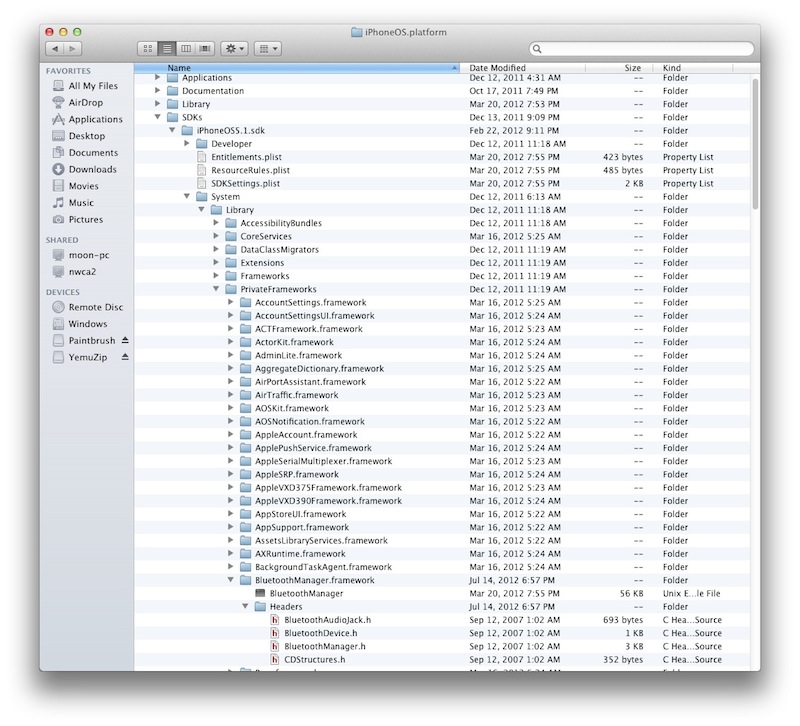
Browse to your Xcode installation at:
/Applications/Xcode.app/Contents/Developer/Platforms/iPhoneOS.platform/Developer/SDKs/iPhoneOS5.1.sdk/System/Library/PrivateFrameworks/BluetoothManager.framework
Create a new folder, “Headers”, and copy the 4 .h files there:
Adding the new Framework in Xcode
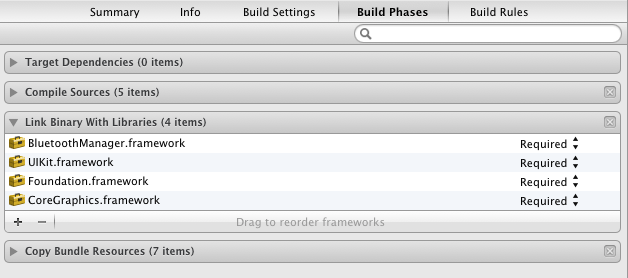
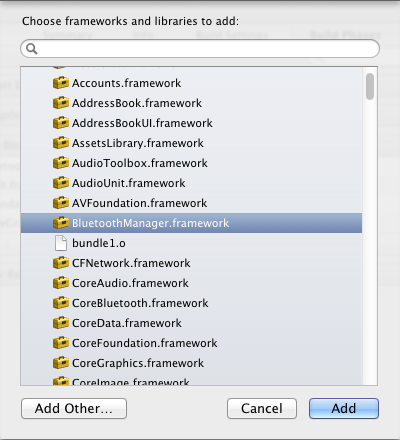
Go to Xcode, click the project in the Navigator, and select “Build Phases”. Under “Link binary with Libraries”, press the Plus symbol. Select BluetoothManager.framework and click Add.
Using BluetoothManager.framework
In your
viewDidLoad
do the following:
1. get an handler to and instance of the BluetoothManager service:
// setup bluetooth interface
btManager = [BluetoothManager sharedInstance];
2. register for notifications, for Bluetooth radio change (on/off) and for discovering a new device:
 // setup bluetooth notifications
    [[NSNotificationCenter defaultCenter]
     addObserver:self
     selector:@selector(deviceDiscovered:)
     name:@"BluetoothDeviceDiscoveredNotification"
     object:nil];

    [[NSNotificationCenter defaultCenter]
     addObserver:self
     selector:@selector(bluetoothAvailabilityChanged:)
     name:@"BluetoothAvailabilityChangedNotification"
     object:nil];
3. Not needed for the purpose of this app, but it really helped me during development, you can set a notification Observer, and get all system notifications, including the Bluetooth notifications or other unknown notifications. You can later register them as shown at step 2).
  // global notification explorer
    CFNotificationCenterAddObserver(CFNotificationCenterGetLocalCenter(),
                                    NULL,
                                    MyCallBack,
                                    NULL,
                                    NULL,
                                    CFNotificationSuspensionBehaviorDeliverImmediately);
And the callback function is a simple debug logger, outside viewDidLoad:
// global notification callback
void MyCallBack (CFNotificationCenterRef center,
                 void *observer,
                 CFStringRef name,
                 const void *object,
                 CFDictionaryRef userInfo) {
    NSLog(@"CFN Name:%@ Data:%@", name, userInfo);
}
As I said, this is an extremely useful piece of code.
4. Set the callback for the notifications registered at step 2):
/* Bluetooth notifications */
- (void)bluetoothAvailabilityChanged:(NSNotification *)notification {

    NSLog(@"NOTIFICATION:bluetoothAvailabilityChanged called. BT State: %d", [btManager enabled]);
}
And here is the second one, for discovering devices nearby:
- (void)deviceDiscovered:(NSNotification *) notification {

    BluetoothDevice *bt = [notification object];

    NSLog(@"NOTIFICATION:deviceDiscovered: %@ %@",bt.name, bt.address);

    //create a new list item
    BTListDevItem *item = [[BTListDevItem alloc] initWithName:bt.name description:bt.address type:0 btdev:bt];

    //add it to list
    NSMutableArray *tempArray = [[NSMutableArray alloc] initWithArray:btDevItems];
    [tempArray addObject:(item)];
    btDevItems = tempArray;
    [myTableView reloadData];
}
As you can see, the incoming notification itself is a newly discovered device, sent in the form of a BluetoothDevice object. To get it correctly I’ve used :
BluetoothDevice *bt = [notification object];
We store the name, the bluetooth address and the pointer to the BluetoothDevice object for later use. The name and address is used to populate the list view:
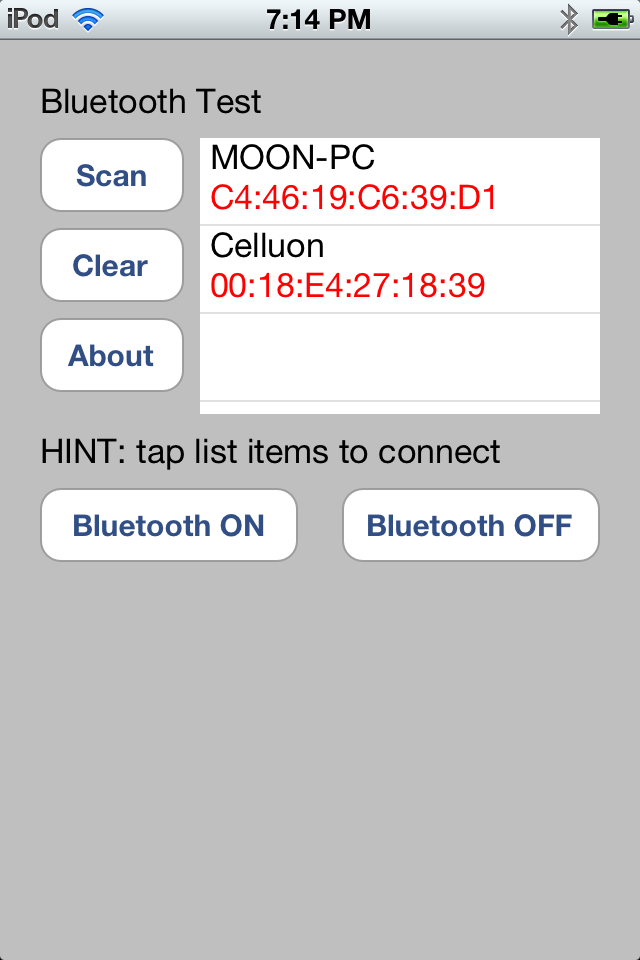
5. Turn bluetooth on / off . This is easy: we have two buttons, pressing them results in calling one of the following methods:
/* Interface actions - bt on */
- (IBAction)bluetoothON {
    NSLog(@"bluetoothON called.");
    [btManager setPowered:YES];
    [btManager setEnabled:YES];

}

/* Interface actions - bt off */
- (IBAction)bluetoothOFF {
    NSLog(@"bluetoothOFF called.");
    //BluetoothManager *manager = [BluetoothManager sharedInstance];
    [btManager setEnabled:NO];
    [btManager setPowered:NO];
}
6. Triggering bluetooth discovery. I do not enable searching for nearby bluetooth devices by default. Instead, I’ve added a Scan Button. The logic behind it is as following: check the bluetooth state , if on, start looking for nearby devices (resulting in device found notifications), if bluetooth is off, just throw an error message to inform the user:
/* Interface actions - scan */
- (IBAction)scanButtonAction {
    if ([btManager enabled]) {
        // clear listview
        [self clearAllList];
        // start scan
        [btManager  setDeviceScanningEnabled:YES];
    } else {
        showMessage(@"Error", @"Turn Bluetooth on first!");
    }
}
7. Establishing a connection
There are two approaches here:
7A. Use BluetoothManager’s “connectDevice” method (see BluetoothManager.h) . This method taken a single parameter, a string representing the bluetooth address we need to connect to. For some reason this only worked partially, so I abandoned this method in favor of:
7B. Use BluetoothDevice’s “connect” . Remember when we saved a pointer to a BluetoothDevice in the Discovery callback function? Now it’s so easy using it!
When the user clicks an item in our list, we do the following:
- (void)tableView:(UITableView *)tableView didSelectRowAtIndexPath:(NSIndexPath *)indexPath {
    BTListDevItem *item = (BTListDevItem *)[btDevItems objectAtIndex:indexPath.row];

    NSString *message = [NSString stringWithFormat:@"Device %@ [%@]", item.name, item.description];

    showMessage(@"Connect to:", message);

    [self deviceConnect :( indexPath.row)];

}
And the deviceConnect function, taking a parameter identifying the index of the device we want to connect to , in our array of devices , is even simpler:
/* Bluetooth connectivity */
- (void)deviceConnect:(NSInteger)index {
    BTListDevItem *item = (BTListDevItem *)[btDevItems objectAtIndex:index];
    NSLog(@"deviceConnect to %@", item.name);

    [item.btdev connect];
}
The connection results
I’ve tried to connect to a notebook computer equipped with Bluetooth (named Moon-PC) and to a HID Bluetooth Keyboard (named Celluon).
Connecting to the notebook
The notebook exposes the following Bluetooth profiles:
Bluetooth File Transfer Service
Bluetooth Information Synchronization Service
Bluetooth Object Push Service
Bluetooth AV Service
Bluetooth Headset Service
The BluetoothDevice.connect() resulted in the following:
 2012-07-16 19:51:25.364 Bluetooth[706:707] deviceConnect to MOON-PC
 2012-07-16 19:51:25.366 Bluetooth[706:707] BTM: connecting to device "MOON-PC" C4:46:19:C6:39:D1
 2012-07-16 19:51:27.743 Bluetooth[706:707] BTM: attempting to connect to service 0x00000010 on device "MOON-PC" C4:46:19:C6:39:D1
 2012-07-16 19:51:27.751 Bluetooth[706:707] BTM: attempting to connect to service 0x00000008 on device "MOON-PC" C4:46:19:C6:39:D1
 2012-07-16 19:51:28.994 Bluetooth[706:707] BTM: connection to service 0x00000010 on device "MOON-PC" C4:46:19:C6:39:D1 failed with error 305
 2012-07-16 19:51:30.286 Bluetooth[706:707] BTM: connection to service 0x00000008 on device "MOON-PC" C4:46:19:C6:39:D1 failed with error 305
The Celluon keyboard only exposes the HID profile, and here is the connection result:
 2012-07-16 19:53:45.727 Bluetooth[706:707] deviceConnect to Celluon
 2012-07-16 19:53:45.732 Bluetooth[706:707] BTM: connecting to device "Celluon " 00:18:E4:27:18:39
 2012-07-16 19:53:47.204 Bluetooth[706:707] BTM: attempting to connect to service 0x00000020 on device "Celluon " 00:18:E4:27:18:39
 2012-07-16 19:53:47.216 Bluetooth[706:707] BTM: connection to service 0x00000020 on device "Celluon " 00:18:E4:27:18:39 failed with error 305
It is clear that the BluetoothManager identified 2 of the 5 profiles exported by the notebook, and the HID profile exported by the Celluon keyboard. These profiles seem to be coded with the hex identifiers shown in the debug content: 0x00000010, 0x00000008, 0x00000020
Even if the connection fails, it is a good starting point in investigating how to establish a solid connection, and receive data. Since the services are recognized by the BluetoothManager , it is surely possible to use the existing functionality, and the already implemented protocols.
This research work has been performed on an iPod, running OS 5.1 .
You can use this code or any parts of it, ONLY if you provide a visible link within your work/project/article, to this webpage. If you agree, you can download the complete source code: Bluetooth iOS Code.
Hi, Do you know if we can turn on/off airplane mode or wifi programmatically in IOS 5.1 on a non-jail broken device?
Hello! Thank you very much for this great tuorial.
I’ve got an iPhone 4 with iOS 5.1.1 and I’m trying to get a list of bluetooth devices around me. So I’ve compiled your project with xcode, but the App never receives a BluetoothDeviceDiscoveredNotification.
I can’t find why!
I’ve even injected my own discoveryEventCallback (replacing the one in BluetoothManager) to see if the notification was blocked by BluetoothManager but it’s never called (I’m sure of my injection because the same injection with discoveryStatusCallback is working) so the problem would be at the level of MobileBluetooth… strange.
I precise that [btManager deviceScanningEnabled] returns 1 so it isn’t the problem.
Btstack detects my devices.
I have no “apple supported” bluetooth devices to test how they’re discovered so I’m out of solutions…
Did I miss something?
Thanks for any help
Wowowooo!!!
Excuse me for this post… Sometimes taking a brake solves the problems!
I solved it like that: replaced [btManager setDeviceScanningEnabled:YES]; with [btManager scanForServices:0xFFFFFFFF];
Thanks again!
thanks for your feedback, glad to hear you got it working!
Hi again!
Do you have an idea of a possible way to access the transfer data when a device is paired?
I have connected a magic mouse, but I don’t really know how to do now.
The events of the apple bluetooth keyboard seem to be implemented in the IOHIDFamily kext but I’m not an expert at reverse engineering so…
Thanks for all the info
If someone else is interested, you can access a connected HID device using the IOHIDManager. (an example for MacOSX here: http://www.pjrc.com/tmp/bug.c)
So now I can connect to my two bluetooth mouses and get all the HID reports correctly!
That sure looks like an interesting piece of information, did you have the chance to test it?
Hi i m trying to find my iphone with this code i added gamekit framework but nothin happen did you try it to check iphone devices?
actually my purpose is to get something like a id of device the time of checking and the the time of unchecking if i can tell this like dat
Hi,
any idea, why the program is not running on iPad (or iPad Simulator)?
Comiled as iPhone APP and not as Universal App, then the App is running on iPad.
Hi,
I am trying your code and it is function well. many thanks for that.
But one thing is for me not really clear.How did you connect with the service?
thanks a lot.
Hi,All;
Like @Guigeek did, I found the bluetooth device; but how could I transfer data between them? Do I need to pair them first?
—-Thank you very much?
Hi KD,
If you want to run this app on iPad Simulator then you have to replace following method in BTAppDelegate.m
– (BOOL)application:(UIApplication *)application didFinishLaunchingWithOptions:(NSDictionary *)launchOptions
{
self.window = [[UIWindow alloc] initWithFrame:[[UIScreen mainScreen] bounds]];
// Override point for customization after application launch.
// if ([[UIDevice currentDevice] userInterfaceIdiom] == UIUserInterfaceIdiomPhone) {
self.viewController = [[BTViewController alloc] initWithNibName:@”BTViewController_iPhone” bundle:nil];
//} else {
// self.viewController = [[BTViewController alloc] initWithNibName:@”BTViewController_iPad” bundle:nil];
// }
self.window.rootViewController = self.viewController;
[self.window makeKeyAndVisible];
return YES;
}
Thanks,
Cp
Its really great work.If I want to know if paired device is bluetooth audio device , can I know that?
Thanks,
Snehal
Hi, thanks for your tutorial and sample, it’s running well until I got the “failed with error 305” log.
In my application I want to connect accessory without doing setting in “setting->bluetooth”.
Here I have 2 questions:
1)How to connect to the Accessory correctly?
2)Normally after I click “scan” information of the accessory show up in the tableview shortly, but if I click the item trying to connect it, I got the “failed with error 305”, after that the accessory can never be detected again when scanning, no matter how many times I restart the application and accessory. Only after I restart the iPhone, the accessory can be detected again. Why? and How to do with it?
Hi,
I was able to scan for devices and to pair the device, too.
But then I was not able to connect and transfer data… Can you give me directions?
Hi Guys,
I am new to the development of apps on iOS, in my app I want to get the already connected blue-tooth device name to iOS device. I need the blue-tooth device name to have some user interface. As I am new to this can some one suggest regarding getting the already connected device name without scanning for the blue-tooth devices.
Waiting for your reply.
Thanking you in advance.
Sam
Hi,
I have used your framework, but I have one issue, when the device get disconnected with other is there any notification called so that I should know that the XYZ device is disconnected. Like you have given the “BluetoothDeviceDiscoveredNotification” same as that.
Basically I am creating an app that should give me notification like discovered device is disconnected.
Waiting for your reply. Thanks in advance.
Pradip
Hi, I want to use this app to connect to a Bluetooth Low Energy device. The app works on my iPad after making the changes above and finds standard bluetooth devices but cannot find my BLE device. However, I found a paid app that finds the device and connects to it. Is there something I have to add or change to get this app to connect to BLE devices?
Thanks
Kyle
Hi, Radu,
Thanks for the good work and sharing. I was wondering, is there an environment variable you set so that you can get the debug information like the following?
BTM: connecting to device “MOON-PC” C4:46:19:C6:39:D1
Perhaps an environment variable for BluetoothManager?
Thanks, –Major
@Guigeek: I am not able to see [btManager scanForServices:0xFFFFFFFF]; Can you please help me? I want to pair Bluetooth headset within the app.
Hello Radu, thanks this website is very helpful. Now I am tying to pair/connect to a device where I know the BT address. I don’t want to run the scan. So I believe I need to create a BluetoothDevice object like this: BluetoothDevice* btDev = [[BluetoothDevice alloc] initWithDevice:xxx];
The parameter xxx is of type (struct BTDeviceImpl *). Do you know how this struct is defined? I couldn’t find anything about it.
hi thanks for the great article.
but iam unable to connect and send the data using this private api pls help me.
I am able to connect to my device. I see my devices name pop up in the debugger when i switch it on and off. Im just wondering how am i registering for input? When i press buttons on my bluetooth remote nothing happens. Thanks
What is “btDevItems” in whole code..
Gettin error on it..
Got the code n its working.. Thnxx 4 it…
But it doesnot allow me to pairup any other device with my app… cud u please explain why is it happening…
hi,
thanks for giving a use full information,but how to send data,image,audio file to another devices.Can you give the valueble information
Thanks&Regards.
Nagavarma.
Hi Everyone,
I just need to discover all the bluetooth devices which are around, no need of connection. Is there any way by which my app will be approved by appStore too and will be able to just discover nearby bluetooth devices…
Thanks and Regards,
Sanjay Gupta
can you plz replay me how to synchronise two iphones using bluetooth
it’s possible or not
Hello Everyone,
Can anyone tell me how can we detect button events of a blutooth device (paired with our ipohone) in our application, such as
an imedia or heitachi blutooth remotes?
thanks in advance
Hi,
How to send data,image,audio file to paired devices.
Thanks in Advance,
Nagavarma
Dear author (and other experts),
I am pretty sure you are also very knowledgeable with the CoreBluetooth.Framework. I am having some challenges and would like to get your advice. Thank you very much in advance.
So with BluetoothManager.Framework, we have already achieved that when our App is opened, there is a dialog asking users whether to turn on the Bluetooth or not. When users click “YES”, the App will turn on the Bluetooth without going to the System Setting Page. However, with this Private Framework, we got rejected when submitting our App to App Store.
Is it possible to use CoreBluetooth.Framework to turn on the Bluetooth on a dialog along with the App welcome page? Or even if we use this CoreBluetooth.Framework, the users will still have to be routed to the System Setting Page first?
Your prompt response will be highly appreciated.
Best regards,
Alfred from California
Hi Alfred,
I don’t think you’ll get your app approved if using private APIs.
Hi Radu,
Thank you very much for the quick response. I understand using Private API won’t get approved because we’ve got rejected already as I mention. 🙁
It seems to me, however, that CoreBluetooth.Framework which is the option#2 you mentioned is a public API. So my question is that with this CB Framework, can you turn on/off Bluetooth on a custom dialog without navigating to the System Setting Page and “manually” turn it on/off?
I am builing door locks and I don’t want my users (consumers) to spend extra 10-15 seconds to first go to the setting page and then come back to the App and then be able to operate their home locks.
Please advise. Thank you.
Alfred
Hi Radu.
i can connect to device but, ¿can i send and read data ?
Hi ,
I am working on one project,Using bluetooth i have to transfer some data among iOS devices.
example ,One iOS device is acting as Server,some other iOS devices acting as clients,using bluetooth i want to establish connection among them and transfer data vice-versa.
Please Advise,Thank you
Srikanth
I only want to find any bluetooth device in range(not want to connect or transfer data, only detect if any bluetooth device(not necessarily iOS device) is there in range) and i got to publish app on apple app store as well, is there any framework that will work for me?
Hi Radu,
first , excuse me for my low knowledge of the iPhone programming.
We have a problem with iPhones, with a hardware device that is based in discovering close devices.
As you know iPhone sets its visibility ON (discoverable) while the phone is in the Bluetooth Menu (or I think so). We need to set the device “always discoverable”. I would like to know if it can be done with the private API´s.
– Something like just set Discoverable ON from an APP.
– Or if the iPhone setd Discoverable OFF in a time, something running in background that checks the change in Discoverability, and sets in agian ON when the device turns it OFF.
– The last question, if if this is possible with Jailbreak.
Thanks for you attention.
@Andres, Hi! Yes , I believe this can be done.
Thanks Radu.
If you know something more, or where to ask for this subject, the info will be appreciated.
Thanks again
Andres, not sure where you could ask for more details . The results above were part of my research work I did some time ago.
Radu, I’ve been using your examples to work with the private API and until recently it worked great. I have found that none of this works on iOS 7 when using an iPhone 5S, although strangely it continues to work in iOS 7 with iPhone 4,4S and 5. Any idea about what’s going on on with the 5S?
Hi Paul, it’s been a while since I worked on this, and currently have no clues on what changed and how.
Radu,
is it possible to get the complete project a src code from you?? Somehow I do not get it to work.
Ups
sorry – there is the link at the bottom. Now I found my issue. It works now
Hi Radu,
Thanks for the guide. Its a really good one for showing how to connect, but did you ever get any RFCOMM (serial) data going between the devices.
I am wondering if you ever tried that, as this would be a logical next step to what you were trying to achieve as mentioned above: “discover nearby devices, and establish a RFCOMM connection”
Looking through the functions in the header file, I do not see any send data methods, or any other way of doing this.
Would really appreciate if you could point me to a useful resource.
Cheers
Not work in ios 7, iphone 5s, 🙁
I am newbie, no clues, 🙂
Hi
I’m trying to connect an iOS device with a little printer. I don’t want the user to have to go to the settings to pair them.
Would it be possible to get them pair with this? It’s not for the App Store, so I’m safe that way.
I will know the MAC address and the Bluetooth pin of each printer, so “forcing” the pairing hopefully should be possible.
Any help and code snippets would be gratefully appreciated.
Hi,
This sample runs in iOS 6.1 and iOS 7.0.4 but in iOS 7.0.4 cannot scan. Do you have any idea what is the problem in iOS7.0.4
Hi,
I am getting below build error when I choose my IPhone 5S (iOS7.1). Do you have any idea what is the problem? When I choose target IPhone Retina 4inch 64 bit, compiles/build/run fine on the simulator.
ld: framework not found BluetoothManager
clang: error: linker command failed with exit code 1 (use -v to see invocation)
Any help is much appreciated.
Hey,
Questions:
1. What is the next steps to send / recv data? Does someone have an extended sample that does so?
2. Do I have to write HID driver over the PC (Win8)?
Has someone managed to transfer data over BT (Windows-iOS)?
does anyone know how could we transfer data between them using BluetoothManager.framework?
Does anyone know how to transfer data using BlutoothManager.framework? I found that there are three empty struct declaration in the header:BTAccessoryManagerImpl & BTSessionImpl &BTDeviceImpl,maybe the answer lies in here.any help,bloody thx.
Dear Radu
do you know how to transfer data using BlutoothManager.framework? I found that there are three empty struct declaration in the header:BTAccessoryManagerImpl & BTSessionImpl &BTDeviceImpl,maybe the answer lies in here.any help,bloody thx.
Dear me
Can we modified the CLF (compact light florescent)circuit into induction heater circuit thank you
problem of #import “NSObject.h” in #import “BluetoothManager.h” class …. plz help me
NSObject.h is not found in DeviceManager.h…………….
Hi Radu,
Does the code can support HID bluetooth profile?
i’m trying to link my iOS device with a bluetooth module which using bluetooth HID profile
Can provide bluetooth HID protocol set?
Thank you.
I am not able to use this library in ipad mini2 or mini3. This is working good with ipad mini1. Can you please help to fix this problem? I am getting below error when i use
btManager = [BluetoothManager sharedInstance];
Error Log
: BTM: attaching to BTServer
: Failed to attach to the Bluetooth daemon: -304
: BTM: session attach called back with BT_SESSION_ATTACHED (fffffed0)
: BTM: attemping to re-attach in 1 seconds