
There are times when you want to lock your Activity in Landscape only or Portrait only modes (using AndroidManifest’s
clause or directly from code using
setRequestedOrientation(ActivityInfo.SCREEN_ORIENTATION_PORTRAIT);
).
But parts of your interface might need to update based on orientation changes (user rotates the device).
The problem is that having your Activity orientation locked, you won’t receive the OnOrientationChanged notification.
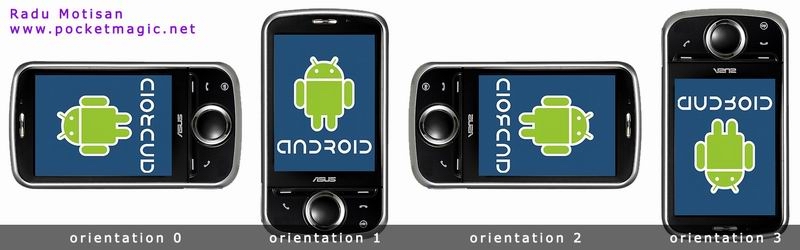
To solve this issue you will need to do two things:
1. register for sensor notifications, in this case we’ll need the Sensor.TYPE_ORIENTATION
2. know the device natural orientation (for tablets it is landscape orientation, for phones it is portrait), because the coordinate-system returned by the sensors, is defined relative to the screen of the phone in its default orientation
Here’s how to code it:
1. In your Activity class define the following variables:
//sensors
	private SensorManager		sensorManager;
	private static final int	sensor 					= SensorManager.SENSOR_ORIENTATION;
	private Sensor 				mySensor;
	int						m_nOrientation				= -1;						// invalid default value
2. In your Activity’s OnCreate setup your sensor variables :
        // get sensor manager
        sensorManager = (SensorManager) getSystemService(SENSOR_SERVICE);
        // get sensor
        mySensor = sensorManager.getDefaultSensor(Sensor.TYPE_ORIENTATION);
3. In your Activity’s OnResume register for sensor notifications, and in OnPause remove them:
@Override public void onResume() {
	super.onResume();
	if (sensorManager!= null)
		sensorManager.registerListener(this, mySensor, SensorManager.SENSOR_DELAY_NORMAL);
@Override public void onPause() {
	super.onPause();
	if (sensorManager != null)
		 sensorManager.unregisterListener(this);
}
4. Make the main Activity class implement SensorEventListener, and add the interface methods onAccuracyChanged and onSensorChanged. Add the following code to onSensorChanged:
@Override
public void onSensorChanged(SensorEvent event) {
	// TODO Auto-generated method stub
	if (event.sensor.getType() == Sensor.TYPE_ORIENTATION) {
		//The coordinate-system is defined relative to the screen of the phone in its default orientation
	        int orientation = 0;
		float roll=0;
        	float pitch=0;
		switch (getWindowManager().getDefaultDisplay().getRotation())  {
            	case Surface.ROTATION_0:
                	roll=event.values[2];
			pitch=event.values[1];
		break;
		case Surface.ROTATION_90:
			roll=event.values[1];
			pitch=-event.values[2];
		break;
		case Surface.ROTATION_180:
			roll=-event.values[2];
			pitch=-event.values[1];
		break;
		case Surface.ROTATION_270:
			roll=-event.values[1];
			pitch=event.values[2];
		break;
		}
		if (pitch >= -45 && pitch < 45 && roll >= 45) orientation = 0;
		else if (pitch < -45 && roll >= -45 && roll < 45) orientation = 1;
		else if (pitch >= -45 && pitch < 45 && roll < -45) orientation = 2;
		else if (pitch >= 45 && roll >= -45 && roll < 45 ) orientation = 3;

		if (m_nOrientation != orientation) { //orientation changed event
			m_Inst.Debug(LOG_TAG,"onSensorChanged: orientation:" + orientation);
			m_nOrientation = orientation;
			// fire event for new notification, or update your interface here
		}
	}
Thanks go to diyism, on stackoverflow.
This article has 1 Comment