
PocketMagic

PocketMagic

Where Technology meets magic


Android
47 Posts
BlackBerry
4 Posts
Electronics
69 Posts
Hardware
123 Posts
High Voltage
49 Posts
Image processing
2 Posts
iPhone
4 Posts
Linux
2 Posts
Nuclear
20 Posts
Optics
11 Posts
Photography
7 Posts
Photoshop
3 Posts
Research
19 Posts
Reviews
18 Posts
Robotics
8 Posts
Security
7 Posts
Software
76 Posts
Symbian
2 Posts
Tubes
20 Posts
Windows
3 Posts
Windows Mobile
11 Posts

Top Articles!       See PocketMagic on Facebook


Building a robot – Part 2 | 8758 Views | Rate 67.37
Building a robot – Part 2
uRADMonitor - Online Radiation monitoring station | 16017 Views | Rate 67.02
uRADMonitor - Online Radiation monitoring station
Bluetooth and iOS - Use Bluetooth in your iPhone apps | 21795 Views | Rate 64.87
Bluetooth and iOS - Use Bluetooth in your iPhone apps
Cartoon yourself using Leptonica | 113 Views | Rate 56.5
Cartoon yourself using Leptonica
NMEA GPS Library for AVR Microcontrollers | 5780 Views | Rate 51.61
NMEA GPS Library for AVR Microcontrollers
Programmatically Injecting Events on Android - Part 2 | 6468 Views | Rate 46.53
Programmatically Injecting Events on Android - Part 2
A 3D Carousel View for Android | 185 Views | Rate 46.25
A 3D Carousel View for Android
Simple Switched power Supplies | 18888 Views | Rate 45.84
Simple Switched power Supplies


Android 4.0 (Ice Cream Sandwich) Emulator How-to


By Radu Motisan Posted on December 10th, 2011 , 797 Views (Rate 1.44)


To test your apps for compatibility with the new OS 4.0 from Android, the emulator is the first choice unless you already have the hardware. Here's what you need to do to get it running:

Installing the Android 4.0 SDK (skip this if you already have it)
Step 1: go to your android SDK folder and start SDK Setup.exe . You will get the following screen:
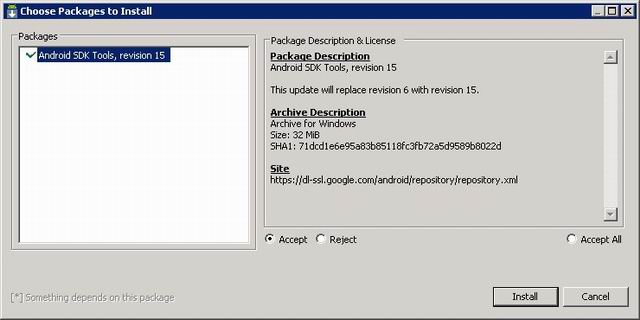
Step 2: confirm the following steps and indicate you are willing to update. If you are getting the following error:
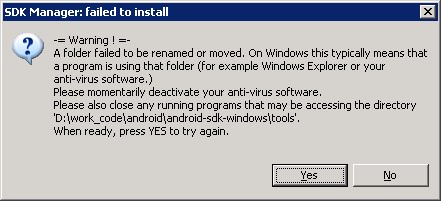
Then update is not for you - you will need to download the latest SDK package from Google and run that one directly. Here is the link.

Preparing the emulator:
Step 1: Assuming you now have the latest SDK, start SDK Manager.exe , and check all items under Android 4.0
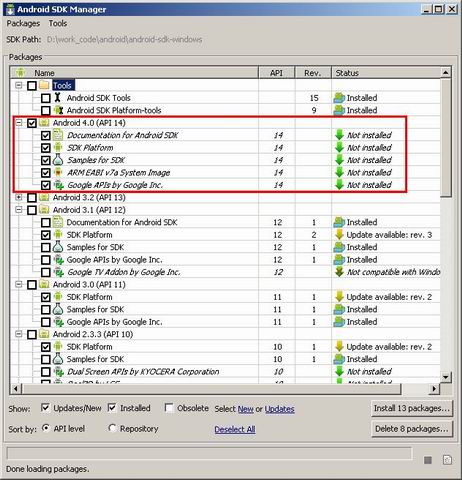
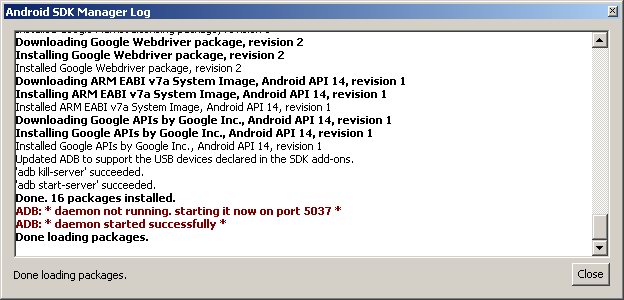
Proceed to install. This might take some time. At the end you get a confirmation screen.
Step 2: from the SDK directory, start AVD Manager.exe . Hit NEW to configure a new Emulator. A few more settings are needed to customize your virtual android device. This is what I choose:

Step 3: Press start to run the emulator. It will take some time to start.

Alternatively, there's are also a few virtual machine images on xda-developers.com. I suggest you take a look at them as well:

http://forum.xda-developers.com/showthread.php?t=1373161

http://forum.xda-developers.com/showthread.php?t=1350819


More on PocketMagic:

Atmega8 and enc28J60 for ethernet support | 8773 Views | Rate 27.25
Atmega8 and enc28J60 for ethernet support
How to make metallic sodium | 1382 Views | Rate 26.58
How to make metallic sodium
Tube: USN-5J29 | 1042 Views | Rate 26.05
Tube: USN-5J29
Tube: GP-5 (ГП-5) | 611 Views | Rate 25.46
Tube: GP-5 (ГП-5)
How to set the AVR Fusebits | 2503 Views | Rate 25.28
How to set the AVR Fusebits
Dual H-Bridge for controlling two motors | 2058 Views | Rate 24.8
Dual H-Bridge for controlling two motors

Thank you for commenting. Your comment won't show until approved, which can take some time.

Please copy the string H3mPnn to the field below: