
By default, the currently limited (2011) Android Bluetooth SDK, only offers access to the Major Class value of any given Bluetooth device (API getMajorDeviceClass() ), while the Minor class is only returned as a combination with the Major class (API getDeviceClass() ).
For a given Bluetooth Device (BluetoothDevice device;), one can get the Major Bluetooth class like this:
int deviceBTMajorClass = device.getBluetoothClass().getMajorDeviceClass();
Then this integer variable can be used to determine the type of the device used:
private String getBTMajorDeviceClass(int major){
    	switch(major){
	      case BluetoothClass.Device.Major.AUDIO_VIDEO: 	return "AUDIO_VIDEO";
	      case BluetoothClass.Device.Major.COMPUTER: 		return "COMPUTER";
	      case BluetoothClass.Device.Major.HEALTH:			return "HEALTH";
	      case BluetoothClass.Device.Major.IMAGING:			return "IMAGING";
	      case BluetoothClass.Device.Major.MISC:			return "MISC";
	      case BluetoothClass.Device.Major.NETWORKING:		return "NETWORKING";
	      case BluetoothClass.Device.Major.PERIPHERAL:		return "PERIPHERAL";
	      case BluetoothClass.Device.Major.PHONE:			return "PHONE";
	      case BluetoothClass.Device.Major.TOY:				return "TOY";
	      case BluetoothClass.Device.Major.UNCATEGORIZED:	return "UNCATEGORIZED";
	      case BluetoothClass.Device.Major.WEARABLE:		return "AUDIO_VIDEO";
	      default: 							return "unknown!";
    	 }
    }
The Bluetooth class (format type 00) is defined as a 3 Octet Integer. Please open the specifications here:
cod_definition
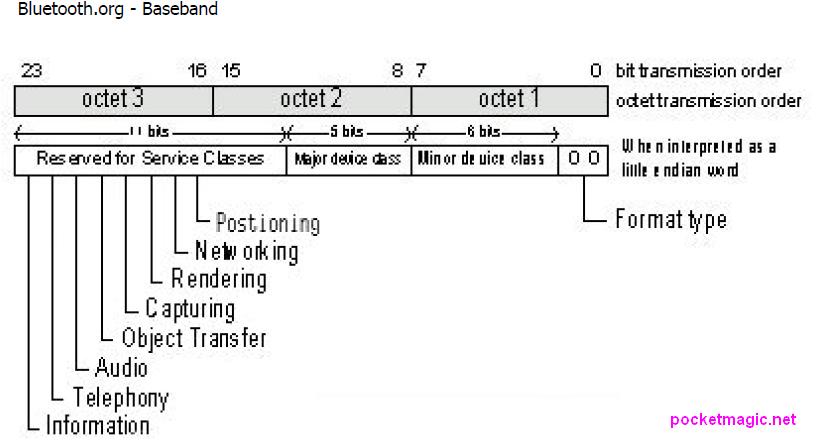
The Android SDK getMajorDeviceClass() API returns an integer corresponding to bits 12-11-10-9-8.
The getDeviceClass() API returns all the lower 12bits, as an integer corresponding to 12-11-10-9-8-7-6-5-4-3-2-1 .
Here are a few examples:
Bluetooth Device: Plantronics 590 A2DP Bluetooth Headset
getMajorDeviceClass: 1024
getDeviceClass:1028
Bits: (octet 3 missing) – (0 0 0 0 0 1 0 0) – (0 0 0 0 0 1 0 0)
Looking in the cod_definition.pdf attached above, on page 3, you will see that octet 2 indicates the Major Class Audio Video, and for the Audio Video Major Class, the Minor class (0 0 0 0 0 1) indicates a “Wearable Headset Device” (page 5).
Bluetooth Device: BeeWi BBK200 Mini Bluetooth Keyboard
getMajorDeviceClass: 1280
getDeviceClass:1344
Bits: (octet 3 missing) – (0 0 1 0 0 1 0 1) – (0 1 0 0 0 0 0 0)
Major class, (0 0 1 0 1) indicates Peripheral, and the Minor class (0 1) indicates a “Keyboard” (page 5, bottom).
To extract the minor class , you will need to take into account which major class was defined, because depending on the Major class, the minor class has a variable width. For Major class “Audio Video” the minor class was defined in bits 7->2, while for Major class “Peripheral”, the minor class uses only two bits, 7->6.
You will need to write several functions like: GetAudioVideoMinorClass, GetPeripheralMinorClass and so on. One would look like:
int GetAudioVideoMinorClass(int cod) {
   return (cod & 0xFF) >> 2; // we only want the last 8 bits, then we shift to the right to only get the first 6
}
The Bluetooth COD specs also define a “Bluetooth Major service class”. This one should be defined in OCTET 3, but Android’s limited SDK only returns the Major device class and Minor device class (octet 2) and (octet 1).
Surprisingly, the info we need is there:
device.getBluetoothClass().toString()
Contains all the three octets. For Plantronics 590, the string is: 0x240404 (it’s hex). Changing that into binary shows:
00100100 00000100 00000100
Page 2 in Bluetooth cod specs, indicates bit 21 is “21 Audio (Speaker, Microphone, Headset service, …)”.
This bluetooth device also has bit 18 set, meaning Rendering (Printing, Speaker, …) .
Thank you for post, it was very helpful for me!!!
P.S. Do you have any ideas how to detect docked keyboard (it think it is usb, not through bluetooth)?
Thank you.
Hi Alex,
It’s been a while since I looked into this, but for USB the HID classes should work the same. Just connect your device, and see how to read it’s class. Next part is straight forward .