
PocketMagic

PocketMagic

Where Technology meets magic


Android
45 Posts
BlackBerry
4 Posts
Electronics
68 Posts
Hardware
120 Posts
High Voltage
49 Posts
iPhone
4 Posts
Linux
2 Posts
Nuclear
20 Posts
Optics
11 Posts
Photography
7 Posts
Photoshop
3 Posts
Research
19 Posts
Reviews
18 Posts
Robotics
8 Posts
Security
7 Posts
Software
73 Posts
Symbian
2 Posts
Tubes
18 Posts
Windows
3 Posts
Windows Mobile
11 Posts

Top Articles!       See PocketMagic on Facebook


uRADMonitor - Online Radiation monitoring station | 14948 Views | Rate 70.18
uRADMonitor - Online Radiation monitoring station
Bluetooth and iOS - Use Bluetooth in your iPhone apps | 18246 Views | Rate 58.86
Bluetooth and iOS - Use Bluetooth in your iPhone apps
NMEA GPS Library for AVR Microcontrollers | 4836 Views | Rate 56.23
NMEA GPS Library for AVR Microcontrollers
Programmatically Injecting Events on Android - Part 2 | 5029 Views | Rate 44.9
Programmatically Injecting Events on Android - Part 2
Building a robot – Part 2 | 4628 Views | Rate 44.5
Building a robot – Part 2
Simple Switched power Supplies | 16179 Views | Rate 41.91
Simple Switched power Supplies
Capacitor Discharge Microspot Welder / Cutter | 11373 Views | Rate 36.45
Capacitor Discharge Microspot Welder / Cutter
Atmega8 and Nokia 5110 LCD  | 1550 Views | Rate 35.23
Atmega8 and Nokia 5110 LCD


How to give an image an old photo look


By Meda Posted on March 30th, 2011 , 326 Views (Rate 0.42)


I've been looking for some techniques to make a photo look old, not black and white, not sepia, but a color old photo look. I've seen this in so many pictures and I must say I liked it a lot especially for those photos that have intense red in it, because this effect makes the photo more greenish. I like high quality colored photos, but for some this old look photo style looks just perfect. And for those of you who are only interested in the result and are not really passionate about Photoshop there are the so called Actions, that are *.atn extension files, and when loaded and played they automatically apply a set of effects, that can be eventually adjusted or even removed for those Actions that are made with layers. The *.atn I've found has no layer but you can see all the effects applied in history.
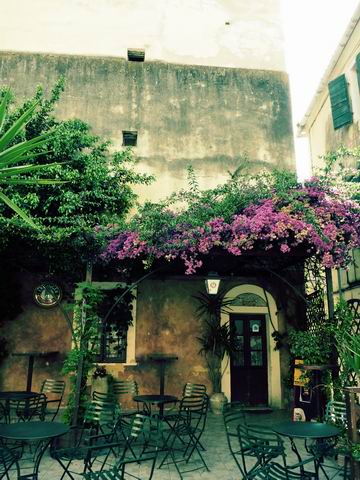
Here is the original photo with a place from Corfu's old city which reminds me of it's old taverns, new cafes, clubs and all kind of shops, a city with narrow streets and architecture strongly influenced by the Venetian style as it was under Venetian rule for a long period of time.

As you can see this photo stands out on it's own, but with the Actions applied it's pretty good too.

Here are the steps:

1.Download the *.atn file.
2.Place it anywhere on your computer
3.Load a photo in Photoshop, make a layer from the background, duplicate the layer so you have the original too.
4.Go to Actions at the right panel near History, click on the down arrow next to the tabs, and hit Load Action.
Browse for the action and load it.
5.Select the loaded action from the Actions and hit the play button that is under the Actions list. Wait until it does it's job.
6.You can see all the steps in the History.


And this is the result. I set the opacity of the transformed layer to 63% so it has a little more from the original image.
As you can see in Actions, there are also other predefined actions you can give them a try too. Or search for other nice desired actions over the net.

Have fun!


More on PocketMagic:

Tube: USN-5J29 | 371 Views | Rate 26.5
Tube: USN-5J29
Atmega8 and enc28J60 for ethernet support | 7303 Views | Rate 24.67
Atmega8 and enc28J60 for ethernet support
How to set the AVR Fusebits | 1717 Views | Rate 23.85
How to set the AVR Fusebits
ATMega128 and HD44780 LCD using 3 Wires with the 74HC164 | 2058 Views | Rate 22.87
ATMega128 and HD44780 LCD using 3 Wires with the 74HC164
Dual H-Bridge for controlling two motors | 1209 Views | Rate 21.59
Dual H-Bridge for controlling two motors
CDV-742 Dosimeter and CDV-750 Dosimeter Charger | 127 Views | Rate 21.17
CDV-742 Dosimeter and CDV-750 Dosimeter Charger

One Response to “How to give an image an old photo look”

  1. 1
    Marianne:

    thank you for this wonderful advice, I will try it on some photos which will be placed in my barber shop

    best regards

    Marianne

Thank you for commenting. Your comment won't show until approved, which can take some time.

Please copy the string NNprDm to the field below: