PocketMagic

PocketMagic

Where Technology meets magic


Android
45 Posts
BlackBerry
4 Posts
Electronics
68 Posts
Hardware
120 Posts
High Voltage
49 Posts
iPhone
4 Posts
Linux
2 Posts
Nuclear
20 Posts
Optics
11 Posts
Photography
7 Posts
Photoshop
3 Posts
Research
19 Posts
Reviews
18 Posts
Robotics
8 Posts
Security
7 Posts
Software
73 Posts
Symbian
2 Posts
Tubes
18 Posts
Windows
3 Posts
Windows Mobile
11 Posts

Top Articles!       See PocketMagic on Facebook


uRADMonitor - Online Radiation monitoring station | 14959 Views | Rate 70.23
uRADMonitor - Online Radiation monitoring station
Bluetooth and iOS - Use Bluetooth in your iPhone apps | 18286 Views | Rate 58.99
Bluetooth and iOS - Use Bluetooth in your iPhone apps
NMEA GPS Library for AVR Microcontrollers | 4843 Views | Rate 56.31
NMEA GPS Library for AVR Microcontrollers
Programmatically Injecting Events on Android - Part 2 | 5039 Views | Rate 44.59
Programmatically Injecting Events on Android - Part 2
Building a robot – Part 2 | 4639 Views | Rate 44.18
Building a robot – Part 2
Simple Switched power Supplies | 16196 Views | Rate 41.96
Simple Switched power Supplies
Capacitor Discharge Microspot Welder / Cutter | 11383 Views | Rate 36.48
Capacitor Discharge Microspot Welder / Cutter
Atmega8 and Nokia 5110 LCD  | 1553 Views | Rate 35.3
Atmega8 and Nokia 5110 LCD


Android Contacts – Invoke the Edit Contact Intent


By Radu Motisan Posted on March 19th, 2011 , 1500 Views (Rate 1.88)


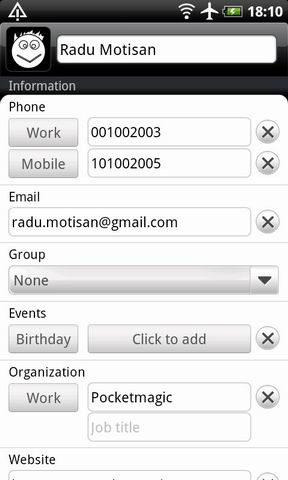
Sometimes, when working with Android contacts, you will need a quick way of showing a contact page, including all the associated fields.
Android has the advantage of reusing almost any piece of code available and the system standard controls make no exception - so you can use the system contacts dialog to load/edit a pre-existing contact.

To open a contact using the Intent.ACTION_EDIT, we have a few variants, with different results:

  • - passing the contact_ID as a parameter with setData():
    1.  
    2. Uri uri = Uri.parse(iduri);
    3. i.setData(uri);
    4. Intent i = new Intent(Intent.ACTION_EDIT);
    5. i.setData(Uri.parse(ContactsContract.Contacts.CONTENT_LOOKUP_URI + "/" + id));
    6. startActivityForResult(i, idEDIT_CONTACT);
    7.  

    works, but it has some issues on a few Android devices.

  • -passing the LOOKUP key as a parameter:
    1.  
    2. Intent i = new Intent(Intent.ACTION_EDIT);
    3. i.setData(Uri.parse(ContactsContract.Contacts.CONTENT_LOOKUP_URI + "/" + id));
    4. startActivityForResult(i, idEDIT_CONTACT);
    5.  

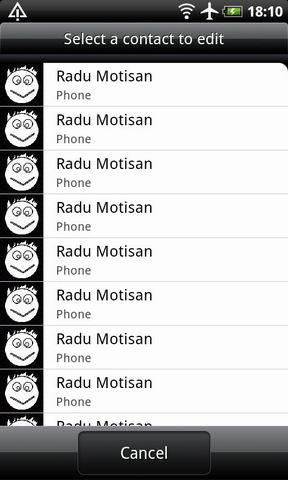
    This works best, and in the case of aggregated contacts, will ask you to select the particular contact you want to open. Using startActivityForResult and onActivityResult, we get a notification when the system form has been closed (either by using Cancel or Save).
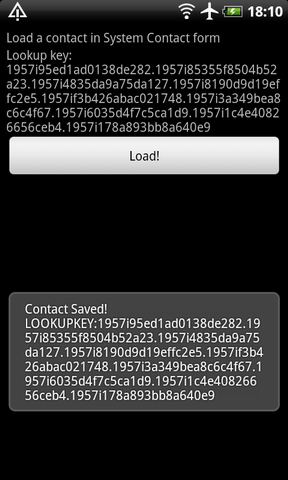
    Alternatively you can first search for a contact (using Name, phone number, etc) and then get the Contact_ID to open the Edit contact Intent . Here is the source code for this sample. It first creates a contact, then it opens it using the lookup key.
    AndroidContacts-3

  • Update April 07, 2011 Another alternative that seems to work even better:
    1.  
    2. Uri contactUri = ContentUris.withAppendedId(ContactsContract.Contacts.CONTENT_URI, read_id);
    3. i.setData(contactUri);
    4. startActivityForResult(i, idEDIT_CONTACT);
    5.  

    Where read_id is a long containing the contact id.


    More on PocketMagic:

    How to set the AVR Fusebits | 1719 Views | Rate 23.88
    How to set the AVR Fusebits
    Repairing a Victoreen CDV-700 6B Dosimeter  | 163 Views | Rate 23.29
    Repairing a Victoreen CDV-700 6B Dosimeter
    ATMega128 and HD44780 LCD using 3 Wires with the 74HC164 | 2060 Views | Rate 22.64
    ATMega128 and HD44780 LCD using 3 Wires with the 74HC164
    Developing for Blackberry 10 | 88 Views | Rate 22
    Developing for Blackberry 10
    Dual H-Bridge for controlling two motors | 1212 Views | Rate 21.26
    Dual H-Bridge for controlling two motors
    USBAsp -  AVR USB Programmer  | 8125 Views | Rate 21.05
    USBAsp - AVR USB Programmer

    One Response to “Android Contacts – Invoke the Edit Contact Intent”

    1. 1
      Android Contacts – a simple Contact Selector « PocketMagic:

      [...] a new Contact using ContentProvider Android Contacts – Custom Contact column to get the LOOKUPKEY Android Contacts – Invoke the Edit Contact Intent Android Contacts – Searching for [...]

    Thank you for commenting. Your comment won't show until approved, which can take some time.

    Please copy the string PvugAj to the field below: