
|
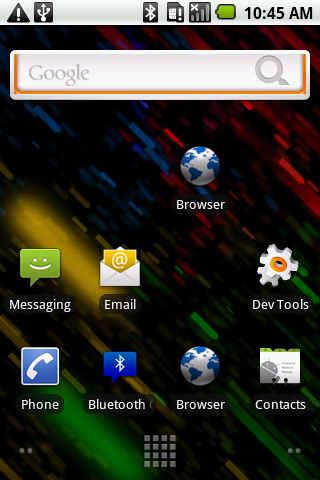
It is possible to write a native C application, that opens the framebuffer (/dev/graphics/fb0) to extract bitmap data representing the screen surface image.
It is also possible to modify the framebuffer data and by doing so to do a low level drawing on screen (that is also very fast). The data must be then converted (aligned/reversed) to standard BMP format, and saved to disc. |
The framebuffer grabber:
static int get_framebuffer(GGLSurface *fb)
{
    int fd;
    void *bits;

    fd = open("/dev/graphics/fb0", O_RDWR);
    if(fd < 0) {
        perror("cannot open fb0");
        return -1;
    }

    if(ioctl(fd, FBIOGET_FSCREENINFO, &fi) < 0) {
        perror("failed to get fb0 info");
        return -1;
    }

    if(ioctl(fd, FBIOGET_VSCREENINFO, &vi) < 0) {
        perror("failed to get fb0 info");
        return -1;
    }

    //dumpinfo(&fi, &vi);

    bits = mmap(0, fi.smem_len, PROT_READ | PROT_WRITE, MAP_SHARED, fd, 0);
    if(bits == MAP_FAILED) {
        perror("failed to mmap framebuffer");
        return -1;
    }

    fb->version = sizeof(*fb);
    fb->width = vi.xres;
    fb->height = vi.yres;
    fb->stride = fi.line_length / (vi.bits_per_pixel >> 3);
    fb->data = bits;
    fb->format = GGL_PIXEL_FORMAT_RGB_565;

    fb++;

    fb->version = sizeof(*fb);
    fb->width = vi.xres;
    fb->height = vi.yres;
    fb->stride = fi.line_length / (vi.bits_per_pixel >> 3);
    fb->data = (void*) (((unsigned) bits) + vi.yres * vi.xres * 2);
    fb->format = GGL_PIXEL_FORMAT_RGB_565;

    return fd;
}
The BITMAP former:
The first thing to do is to convert the Framebuffer’s 16 bit data into 24 bit. We’re not gaining extra-quality here, we’re just “stretching” the colors from:
5 bits blue : 2^5=32 blue color nuances
6 bits green : 2^6=64 green color nuances (in 16bit colors, green has more color space since the human eye is more sensitive to green color)
5 bits red : 2^5=32 red color nuances
32x64x32 possible 16bits colors (2^16)
To:
8 bits blue : 2^8 = 256 color nuances
8 bits green : 2^8 = 256 color nuances
8 bits red : 2^8 = 256 color nuances
A total of 2^24 colors, but as I said we’re just “stretching” the color intervals without any information gain.
  //convert pixel data
  uint8_t *rgb24;
  if (depth == 16)
  {
	rgb24 = (uint8_t *)malloc(w * h * 3);
	int i = 0;
	for (;i RRRRRRRRGGGGGGGGBBBBBBBB
		// in rgb24 color max is 2^8 per channel (*255/32 *255/64 *255/32)
		rgb24[3*i+2]   = (255*(pixel16 & 0x001F))/ 32; 		//Blue
		rgb24[3*i+1]   = (255*((pixel16 & 0x07E0) >> 5))/64;	//Green
		rgb24[3*i]     = (255*((pixel16 & 0xF800) >> 11))/32; 	//Red
	}
  }
  else
  if (depth == 24)
  {
  	rgb24 = (uint8_t *) gr_framebuffer[0].data;
  }
  else
  {
  	//free
        close(gr_fb_fd);
	exit(2);
  };
  //save RGB 24 Bitmap
  int bytes_per_pixel = 3;
  BMPHEAD bh;
  memset ((char *)&bh,0,sizeof(BMPHEAD)); // sets everything to 0
  //bh.filesize  =   calculated size of your file (see below)
  //bh.reserved  = two zero bytes
  bh.headersize  = 54L;			// for 24 bit images
  bh.infoSize  =  0x28L;		// for 24 bit images
  bh.width     = w;			// width of image in pixels
  bh.depth     = h;			// height of image in pixels
  bh.biPlanes  =  1;			// for 24 bit images
  bh.bits      = 8 * bytes_per_pixel;	// for 24 bit images
  bh.biCompression = 0L;		// no compression
  int bytesPerLine;
  bytesPerLine = w * bytes_per_pixel;  	// for 24 bit images
  //round up to a dword boundary
  if (bytesPerLine & 0x0003)
  {
    	bytesPerLine |= 0x0003;
    	++bytesPerLine;
  }
  bh.filesize = bh.headersize + (long)bytesPerLine * bh.depth;
  FILE * bmpfile;
  //printf("Bytes per line : %d\n", bytesPerLine);
  bmpfile = fopen("screen.bmp", "wb");
  if (bmpfile == NULL)
  {
	close(gr_fb_fd);
	exit(3);
  }
  fwrite("BM",1,2,bmpfile);
  fwrite((char *)&bh, 1, sizeof (bh), bmpfile);
  //fwrite(rgb24,1,w*h*3,bmpfile);
  char *linebuf;
  linebuf = (char *) calloc(1, bytesPerLine);
  if (linebuf == NULL)
  {
     	fclose(bmpfile);
	close(gr_fb_fd);
	exit(4);
  }
Now the next thing to do is to align the BGR triplets and to switch order , to match the BMP RGB24 color format.
  int line,x;
  for (line = h-1; line >= 0; line --)
  {
    	// fill line linebuf with the image data for that line
	for( x =0 ; x < w; x++ )
  	{
   		*(linebuf+x*bytes_per_pixel) = *(rgb24 + (x+line*w)*bytes_per_pixel+2);
   		*(linebuf+x*bytes_per_pixel+1) = *(rgb24 + (x+line*w)*bytes_per_pixel+1);
   		*(linebuf+x*bytes_per_pixel+2) = *(rgb24 + (x+line*w)*bytes_per_pixel+0);
  	}
	// remember that the order is BGR and if width is not a multiple
       	// of 4 then the last few bytes may be unused
	fwrite(linebuf, 1, bytesPerLine, bmpfile);
  }
  fclose(bmpfile);
  close(gr_fb_fd);
Download the code: (old code removed, see update below)
Note that you are not allowed to distribute this code without visibly indicating it's author (me) and the source (this page) and You may not embedded it in commercial applications.
To compile the code, use the NDK, as presented in this article.
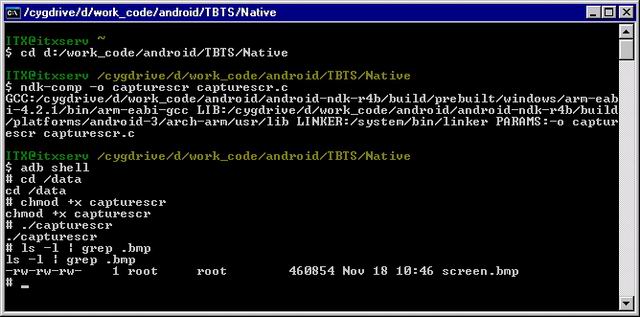
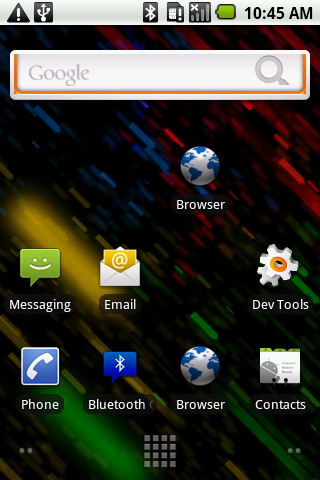
Running the code produces a screen.bmp file:
Hope this helps.
Update, April 03, 2012
By popular demand, I have modified the code to support RGB32 as well. In this case, we have an extra alpha channel, that we need to ignore when creating the final bitmap. So I have added a RGB32->RGB24 converter, but it is only a alpha channel remover, since we are not talking about true RGB32. The Red,Green,Blue channel are still 8bits each, as in the case of RGB24. Peter's solution below works, but I felt the need to write a simpler code:
 if (depth == 32) //skip transparency channel
  {
	rgb24 = (uint8_t *) malloc(w * h * 3);
	int i=0;
	for (;i> 8;	//Green
		rgb24[3*i+2]   = (pixel32 & 0x00FF0000) >> 16; 	//Red
	}
  }
Here is the complete source code, and the native ELF binary file:
Native
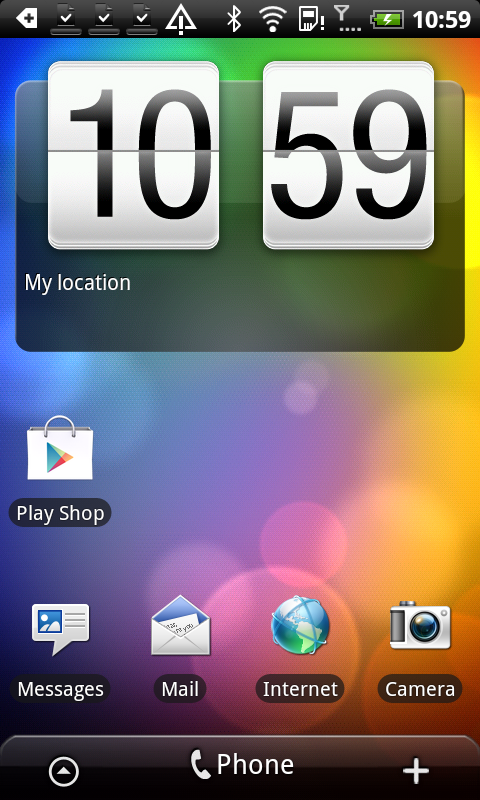
And a BMP result of my Android using an RGB32 screen:
When using capturescr ELF file in ADB shell, you can get the returned error code using:
echo $?
How to do this for a 32 bit depth screen
its very much the same code, see if (depth == 24) …
it is not working from Os 2.2.1l…works fine with 2.2
/dev/graphics/fb0 “can not opened” not accessible or obsolete from 2.2.1…any suggestion?
do you have root access?
how to check if i have root access? well the device i have lg optimus and galaxy s, working fine on lg optimus i guess its allows me root access,what about galaxy s? how to enable root access?
Is it possible to access framebuffer via JNI?
yes, you simply compile my code above with a JNI interface.
I compiled your code with JNI and run it on the rooted emulator, but it can’t access the framebuffer(open(“/dev/graphics/fb0”, O_RDWR) failed).
P.S I also tried to call Runtime.getRuntime().exec(“su”) from java before the native JNI function but it still failed.
am i missing something?
Thanks, you’re right.
I forgot chmod 777 /dev/graphics/fb0.
good.
How to do this for a 32 bit depth screen…
Can you explain more detail?
hello gyeonghochu, what do you need to know?
Thank you for your reply.
Now, I am capturing the screen that is galaxy S.
But I have a problem…
The problem is that “depth” returns 32.
I think that it means that 32 bit..
So I added source code like below…
else if( depth == 32 )
{
rgb24 = (uint8_t *) gr_framebuffer[0].data;
}
But it did not correctly work.
The image is crashed…
So how can I resolve this problem…
Hi,
I tried below to access fbo still i couldn’t open it.
Runtime.getRuntime().exec(“su”);
Runtime.getRuntime().exec(“chmod 777 /dev/graphics/fb0”);
Hi,
It is a rooted device,requested for super user access after SU command but fb0 is not accessible.
hy, can you tell me what to put in
else if( depth == 32 ){
??????
}
can someone help me?
for 32Bit : (Format is : BGRX) X = transparency , we can ignore it)
rgb24 = (uint8_t *) malloc(w * h * 3);
int i = 0;
int j = 0;
int k = 0;
for (k=0; k < w * h; k++) {
uint8_t pixel8 = ((uint8_t *) gr_framebuffer[0].data)[i++];
rgb24[j+2] = pixel8;
j++;
pixel8 = ((uint8_t *) gr_framebuffer[0].data)[i++];
rgb24[j] = pixel8;
j++;
pixel8 = ((uint8_t *) gr_framebuffer[0].data)[i++];
rgb24[j-2] = pixel8;
j++;
i++;
}
Is necessary have be root
hi every body
i am new to android development i just want to know that the code above will work in eclipse or not.
New code added to this article. Enjoy!
Hi Radu,
This sample can’t access /dev/graphics/fb0″ at my nexus one (note: My device is not rooted).
Please can you help me to capture android screen.
Thanks in advance.
Ali
Hi,
Same issue here, i am unable to open the file /dev/graphics/fb0. I tried to change the mode by “chmod(“/dev/graphics/fb0″, 777)”, but its not changing the mode even. Am stuck.. Need help !!!
Note: My device is not rooted.
Hi,
Can’t we save the image in jpeg or png format, instead of BMP??? if so, than how to do it??
Hi
how can we send bitmap using TCP socket. I have already transfer Text but i don’t know how to transfer bitmap. please help me
For me blue color is showing as orange, and orange color is shown as blue…. 🙁 any help?
Just invert blue channel with the red one.
Thanks a lot Radu !! It works perfectly fine now !! Its been a great help by you. 🙂
One little thing more, is it possible to save in any other format? like png or jpeg? Bimap is very large in size.
Thanks in advance.
Hi,
Thanks for the post it really helps! I tried it, and it worked, but in case that there is also video that is playing somewhere on the screen, the captured frame does not include the video, any idea why? and how I can get the video frame as well?
Thanks.
hi,
when i change android minsdk version 3 to 4 code does not work.any reason???
Thanks in advance
Hi,
I’m a newbie when it comes to native coding the android. Frankly, have only written a couple of HelloWorld programs. I understand this is a huge ask, and a waste of your time, but would you be able to explain how I can convert this code to be run via the JNI. What are the files I need to include.
I have a rooted android, and I understand how the FrameBuffer works and also know how the bytes are formed and the conversion which I need to do. The only part I don’t know is how to open the “/dev/graphics/fb0” file from within my program.
Would be most grateful for any help you can provide.
Cheers
It is a relatively simple task to convert the code for JNI : you just rename the functions you plan to use while keeping an eye on the involved data structures: I suggest you return the image data as a byte array, directly to your java program. Then in your Java code you can do all the logic like converting the image to RGBXXX, or converting it to various formats.
To get a start with JNI, see my tutorial on the Android NDK, on this blog.
Works very well… thanks Radu. Kind regards.
Hi
can any body please guide me how to use this code in eclipse i have tried more but unable to use the code please help me.
Thanks
@shah, see the NDK tutorial, here is the link again: http://www.pocketmagic.net/?p=1462
Thanks Radu Motisan for replay. still i am unable to install NDK and my project is stuck for this point to take screenshot… if you guide with more detail i will be realy thankful to you…
Thanks once again
@Shah, what exactly didn’t work for you when installing the NDK? I cannot do the work for you, but I can help you if you have specific questions. If something is unclear about the NDK tutorial, please post your questions under the NDK article.
sir
Actually i have to 2 questions first one is how i can install NDK in eclipse i read almost every tutorial but could not install NDK and second question is that i want to use this code in my application to get screenshot. so how can i use it.. please guide me for this.
thank you very much for your quick response…
To install the NDK, follow the indicated steps: 1,2,3: http://www.pocketmagic.net/?p=1462
If you encounter difficulties, indicate the step where you were unable to continue.
sir
i have install Cygwin and unzip android NDK to my D drive now i am trying to run this command to built native components but its not working cd /cygdrive/d/softkeyboard/project pleas help me to solve this problem
It is not enough to install cygwin and unzip the NDK, you will need to follow all the instructions presented there.
sir please guide me that how can i use this code in eclipse. I think i have install NDK but i don’t know how to cheak that its working correctly. please guide me so that i use this code and run it. thanks alot
sir please would your code work if i launch it from another android application (i test it and i got error : cannot open fb0) thans in advance .
@hamza, the “cannot open fb0” error is exactly what it says: the native code app doesn’t have the right permissions to open fb0.
You will need to set the fb0 to 666 at least. (chmod 666 /dev/graphics/fb0)
Hi Radu, thanks for the quick answer.I tried this [Process process = Runtime.getRuntime().exec(“chmod 666 /dev/graphics/fb0”);] but it still show me cannot open fb0 . I try to work around by launching the compiled code from my application though the method above but it won’t work (but this, it s another problem ^^ ).
First connect with adb (adb shell) and try chmod there. You will need ROOT permissions for chmod to work on this file :/
The code for capturing screen doesn’t need root, but if the permissions are not set it willnot work. It is a vicious circle, blame Google, after all this time they refuse to grow up .
I am so amazed the Windows Mobile platform went down, it was years in front of Android in terms of functionality and platform matureness.
I think i just found a solution for my problem.
http://stackoverflow.com/questions/10689193/execute-file-from-defined-directory-with-runtime-getruntime-exec/10690899#10690899
I will test it tonight. the solution is to exec chmod +x for my file (from my java code) then launch the compiled code from a directory where i have right to write so i can save the screen.bmp. 🙂
I don’t know if it’ll work.
Thanks a lot for you’re tuto
unfortunately that doesn’t help. see my previous comment.
but i’m using a rooted phone. and my application is only for the rooted ones
in this case it will work.
Hi Radu, i just want to know if your compiled file close after taking the screenshot. because in my case when i do ./capturescr in my adb shell it execute the file, i get the screen but the file won’t close without pressing [Ctrl+C]. Any idea ?
Looking at the code, the native program simply saves that file as BMP and exits with return 0. You should no need CTRL+C , but feel free to debug the code and see where it gets stuck on your hardware.
But I think there’s a different issue there, better double check how you are calling that code.
I finally find a way to work with it :).Thanks so much for your help.
Feel free to provide more details and explain what you did: Others reading this might need your help too.
I think it’s not a good way to do it but it work for me.
I just put your compiled file in my raw folder then i copy it to files of my application. execute it from an exec and then destroy my process because the compiled file won’t close automatically as i say before. Here the code 🙂
private void doScreen(){
try {
//copy from raw
InputStream ins = getResources().openRawResource(R.raw.capturescr);
byte[] buffer;
buffer = new byte[ins.available()];
ins.read(buffer);
ins.close();
FileOutputStream fos = openFileOutput(“capturescr”, Context.MODE_WORLD_READABLE);
fos.write(buffer);
fos.close();
//get permission
Process process = Runtime.getRuntime().exec(“chmod +x “+getFilesDir()+”/capturescr”);
process.waitFor();
//execute the screen
process = Runtime.getRuntime().exec(getFilesDir()+”/capturescr”,null,getFilesDir());
Thread.sleep(1000);
//kill the process
process.destroy();
} catch (IOException e) {
e.printStackTrace();
}
}
Hi Radu, I just want to display YUV420sp(or YUV420p) video in ndk. You know, convert it to rgb565 then display is time consuming(the video is 720P). Can I use framebuffer in ndk to display yuv420SP/yuv420p ? any suggestions for that? thanks very much.
Hello lanmic,
It is possible , but you will distort the normal Android screen output by doing this. Your pushed content will look like some kind of unpolished overlay.
I had a sample to draw some content directly with FB, I’ll see if I can find it.
great thanks. and have you any ideas on, what is a better way to display yuv420sp/yuv420p video with high definition(e.g. 1080p) in ndk?
Hi Radu,
I am new to NDK.Can you tell me how to call native method in java.
i had put capturescr.c,format.h and pixelflinger.h in jni folder.
Below is my mk and java file code.
Andori.mk
LOCAL_PATH := $(call my-dir)
include $(CLEAR_VARS)
LOCAL_MODULE := jreet
### Add all source file names to be included in lib separated by a whitespace
LOCAL_SRC_FILES := capturescr.c
include $(BUILD_SHARED_LIBRARY)
Java file
static
{
System.loadLibrary(“jreet”);
}
@Override
public void onCreate(Bundle savedInstanceState) {
super.onCreate(savedInstanceState);
setContentView(R.layout.main);
}
Code compiles successfully but does not create screen.bmp file on sdcard.
Please help what changes I have to make to work it properly.
Thanks in advance.
great article. I’m compiling android for panda as we speak. I’m diving through the code to find the fastest readback point. Would you say this is the fastest and easiest way to get a full screen readback? Glreadpixels is an awful pipeline stall. The goal is a to stream the output to disk
Yes, this should be the fastest approach.
Hi,
I am trying to capture the screenshot of the device but I am unable to read the framebuffer file. I followed the steps mentioned in this post but the open call to the framebuffer file is failing. The code is simple,
int fd = open(“/dev/graphics/fb0″, O_RDWR);
if(fd /mnt/sdcard/fb0”);
This java code seems to work.
I wanted to know if there is anything else which I may be missing in my jni code.
Thanks and Regards,
Abhinav
Sorry the comment seems to have been cut short the previous time
I am trying to capture the screenshot of the device but I am unable to read the framebuffer file. I followed the steps mentioned in this post but the open call to the framebuffer file is failing. The code is simple,
int fd = open(“/dev/graphics/fb0”, O_RDWR);
if(fd < 0) {
__android_log_write(ANDROID_LOG_INFO, LOG_TAG, "Could not open framebuffer file!);
return JNI_FALSE;
}
This piece of code always returns false. I have a rooted phone running cyanogen mod.
Thanks and Regards,
Abhinav
make sure you’ve set the permissions for /dev/graphics/fb0 with chmod first.
Hi Radu,
I have 2 queries.
1. Finally I am able get Image on Samsung Tab(2.2).But I am getting the same problem(blue color is showing as orange, and orange color is shown as blue) as Zeshan.Please write in detail how can I invert blue channel with the red one. Where in Code I have to make changes.
2. On MotorolXoom I have change the the permission of fbo.Below is shell response.
# cd /dev/graphics
cd /dev/graphics
# ls -l
ls -l
crwxrwxrwx root graphics 29, 0 2012-07-26 13:22 fb0
crwxrwxrwx root graphics 29, 1 2012-07-26 13:22 fb1
But when I run the application it gives error in Logcat
07-26 16:17:43.050: D/JazzkActivity(5666): cannot open fb0:-1
Please help!!!!!!!!!!!
@Karan, simply change the Blue channel with the Red channel.
for 2), is the file path correct?
Hi,
Thanks Radu for replying.
1. done for first problem Now I am getting the exact colors.
2. (a)for fbo i am writing like this
fd = open(“/dev/graphics/fb0”, O_RDWR);
(b) shell path is right as i am doing cd to /dev/graphics. ls -l showing files in current path and their permissions and output shows that that i have given permission to file.
(c) capture image path is bmpfile = fopen(“/mnt/sdcard/screen.bmp”, “wb”);
FYI—MotorolXoom sdk version is 3.2
Please help to solve my problem!!!!!
So you’re saying it fails at a) ?
@Radu yes, it is failing at 2(a)
Hi,
The same case is with ACER ICONIA TAB(3.0.1). Device is rooted and permissions are set. but failing while opening file “fb0”. I think code works only at SDK version (2.2 and below).
Please provide some solution which will work on 2.3 and above SDK version.
what’s the value returned by fd? Did you check the error codes to identify the problem?
Hi,
fd value is -1.
Hi,
I had also try to pull,cat and cp command to copy fb0 file but it gives the following error.
C:\Users\karan>adb pull /dev/graphics/fb0 /mnt/sdcard/fb0
failed to copy ‘/dev/graphics/fb0’ to ‘/mnt/sdcard/fb0’: Device or resource busy
i t is giving the same error for cat and cp “Device or resource busy”
I search google but didn’t find anything. I think this is the reason why I am unable to open file file.
Please help!!!!
hi,things worked out just fine ,no errors,except that the pic I got is totally black.And the same code works out on another android phone ,but always returns a black pic on my Galaxy Nexus.Please help.Thanks a lot.
Hi ,,
where i can see the Screen.bmp file ???
My android Emulator rooted , but it cant able to open /dev/graphics/fb0
Kindly Help me …
fd = open(“/dev/graphics/fb0”, O_RDWR);
if(fd < 0) {
perror("cannot open fb0");
return -1;
}
My application always fails here. Is there any way to run the command "chmod 777 /dev/graphics/fb0" programatically?
My devices is rooted.
I face this problem on Galaxy tab 10.1 (android 3.1) only. Everything fine on Nook-Color (Android 2.2)
Hi, I have resolved this by myself. I share the solution here for someone who is looking for it.
This is how I change the system file permission.
Process sh = Runtime.getRuntime().exec(“su”,null,new File(“/dev/graphics/”));
OutputStream os = sh.getOutputStream();
writeCommand(os, “chmod 777 /dev/graphics/fb0”);
os.flush();
readFrameBuffer();
Hello Radu,
Is it possible to send this data to a Microcontroller to display it on another screen (Example: TV). Do I need to convert it into BMP or I can send raw data to the microcontroller in bytes and then to the TV screen.
Thanks in advance.
everything is possible, it would be better to convert it to RGB24 and see how to get to SVIDEO signal from there, that would be compatible with the TV.
Hi Radu,
Thanks for a nice and wonderful blog.
I saw your code and tried it for Samsung Galaxy SII, with some modification
Actually I called function get_framebuffer() in while loop of 60 and saved all bmps after starting timer in mobile.
It saved around 15 bmps per Second, but I saw bmps showed alternative seconds like 59,57,55,53 ….
I tried to find the problem but failed.
Please take a look on that and reply ASP.
I hope you were doing great!!!
Hi Radu,
I am developing a application where user can draw/write something on the screen, and this is recorded as video. Then the user can see the video. How can I proceed? request ur guidance.
Thanks in advance 🙂
Is it compulsory to access the framebuffer via a command-prompt,after connecting the mobile to PC,can I access this code by making the methods available in this code as a native method,and can I invoke it in a Java file using JNI,without the use of command-prompt,and without connecting the mobile everytime?
@arjun, you can invoke chmod from your java source code. so you don’t need to connect to the PC.
hi radu motisan… thank you for your share… i tried this code but the execution returned after this below if condition..
fd = open(“/dev/graphics/fb0”, O_RDWR);
if(fd < 0) {
perror("cannot open fb0");
return -1;
}
please help me… i am using rooted device only(xperia neo v (ICS))..
what
Hi
When i am trying to make a call to the native function get_framebuffer from my Main activity, i am getting a return value of -1. Please note that i am trying to use it from a system app which is signed with proper signatures to access all the system level privileges.
Is it not possible to access the fb0 file from the JNI code? Please suggest on the following.
Is it possible to access the fb0 file without using “su” to run your this as a native code ?
@Kalandar: you need to chmod fb0 as explained in the article
@SKC: you need root to set fb0 permission, see chmod in the article
Thanks Radu for your answer
Having an application signed with system certificates isn’t equivalent to a root permission ?
As suggested by you, I have tried the chmod, but it didn’t work as my phone is not rooted, but whichever app is trying to run these commands are signed with system certificates.
@SKC: unfortunately that is not enough, and it is imperative that you set the fb0 permissions or you won’t be able to read it. So no, will not work if your phone is not rooted. Sorry.
If someone could wrap this into a library for Basic4Android I’d be very grateful, or even a .jar with a list of properties and methods so I could wrap it myself.
At the moment, with root access, I am having to spoof a “su” shell command in my Basic4Android code to “cat” the raw “fb0” file into a temporary folder, and I am now stuck with the nightmare of decoding the raw file to a more useful image format.
What would be far more useful would be to have this wrapped up in a few useful methods / functions, or perhaps even one such as…
GrabFrameBuffer(destinationpath,format,quality,width,height)
I understand this would of course mean that the library would have to detect the exact format of the raw image itself.
Going right back to this base “C” code, can anyone tell me how quick it runs? I’d like to be able to snapshot fast enough to transcode the snapshots to video (at the very least 15 snaps a second, including conversion to jpg or png)
Feel free to flame the hell out of me for not being very good at C, or Java, or the SDK in Eclipse, or anything for that matter. It just irks me that a user can press a combination of buttons to take a screenshot on most android devices, but there is no exposed command in the SDK to do so unless it’s a snap of your own activity. Surely there should be an “add permission” that the user could accept to allow your application to snap whatever is on the screen at any time?
Hi,
I tried your code and it gave me http://i.imgur.com/VSWPNBs.png?1 this screenshot. Any idea how can I correct it?
Hi Radu,
I downloaded the latest code and ran the capturescr on the adb shell (I just used the provided file and didnt compile), it gave me a screen.bmp file. The image file just have black, blue, and red streaks. After unchecking the “force gpu rendering” option, i get a pix somewhat resembling the screen, but still very streaky.
My device is a rooted HTC OneX on ICS.
1. Am I missing anything?
2. Or is it just not reliable to get the screenshot from the framebuffer in recent devices?
Thanks
To add on to the previous post, I noticed a seg fault when running the capturescr. Here’s the link to the screenshot img: http://imgur.com/im8eXW3
Same thing is happening with me too danQ. I am using a Atrix HD which is almost identical to OneX.
The dump function gives these values:
vi.xres = 720
vi.yres = 1280
vi.xresv = 720
vi.yresv = 2560
vi.xoff = 0
vi.yoff = 0
vi.bits_per_pixel = 32
fi.line_length = 2944
And the screenshot looks similar to your one.
Radu???!!!
check the bitmap format.
Anyway converting this native code to a function that can be called from within java code and return an image?
Yes, it is both possible and easy , using JNI. I might write an article on that later.
Hello Radu – I am able to use this code and capture screenshots from Samsung phones. But it captures a black screen shot for Nexus 4. Do you know how to correct it?
How to resolve this problem :
root@android:/data # ./capturescr
./capturescr
failed to mmap framebuffer: Invalid argument
Segmentation fault
-rwxrwxrwx root root 7603 2013-06-25 16:32 capturescr
did you run chmod on fb0?
Hi Radu,
Please can you post a full code example? I actually wanted to take a screenshot of my android device programatically. And this has to happen as a background service.
I tried “os.write((“/system/bin/screencap -p ” + “/sdcard/img.png”).getBytes(“ASCII”));” => This doesnt seem to work.
Any idea?
Regards, Hari
hi Hari,
os.write(… doesn’t seem right. you need to launch the screencap code as a native executable.
Hi Radu.. Thanks a lot for the quick reply. please can you give a hint on how to do that? Sorry- am a dump newbie. 🙁
@Hari, see: http://gimite.net/en/index.php?Run%20native%20executable%20in%20Android%20App
@Radu:
I guess, I am closer to it now. Please can you check if I have done some mistake here?
String run = “cmd /c start ” + Environment.getExternalStorageDirectory().getPath() + “/copyImage.bat”;
Runtime rn = Runtime.getRuntime();
Process pp = rn.exec(run);
I have copied copyImage.bat in /mnt/sdcard/
and the copyImage.bat has the following code:
adb shell /system/bin/screencap -p /mnt/sdcard/Hari.png
is there something wrong here?
Hi Radu..I also tried the following:
String run = “/system/bin/screencap -p /mnt/sdcard/Hari.png”;
Runtime rn = Runtime.getRuntime();
Process pp = rn.exec(run);
No use for this also. I am not getting the result.
Ok Hari, this is getting better, the previous code was… well.. strange.
If you look at the C code you’ll see capturescr doesn’t use any parameters, and outputs the screen capture image to screen.bmp . So the name is capturescr (not screencap), there are no PNGs here, no path, and no -p (where did you get that from??).
You also need to learn about permissions, as capturescr must be set to executable, while fb0 set as readable.
Probably your progress would be faster if you would test all these in the terminal (Adb sheel) before jumping to Runtime exec. Good luck!
Yep!
i am facing same problem which is already discussed above. fd=open(“/dev/graphics/fb0”); is failing
pls help me, I was strucked here…
Hi
I try to build this project.But I can’t find where to download souce code.
Can you send a copy to gyr89@126.com.
Thanks a lot.
Hi,
On java level I am able to do a screenshot between specified “surface layers”. This particularly allows me to make a screenshot of a screen “below my app” – for example if my app has transparent background and some buttons on it then when you run it from home screen you will see the home screen under my app. With a “normal” screenshot you will get the home screen and my buttons, but if you make a screenshot specifying minLayer 0 and maxLayer 21010 with my app having layer 21015, then you will get only the home screen. An example of such “hidden” API is SurfaceControl.screenshot(int width, int height, int minLayer, int maxLayer).
The question is – are those levels somehow stored in the frame buffer which allows you to extract/overwrite/modify them or the frame buffer file already contains the merged and flattened bitmap?
Thanks
hello Radu
I get the same picture every time when i use the code to shot the screen
My phone is HTC one
Hello I want to create a screen capture video with atlist 5 FPS inside app. Will you please provide any example. I just want to capture a video on single activity and its contents. Your help will be greatly appreciated sir.
Email:prash.jadhav777@gmail.com
Thank you,
Can you please provide me full code for “Android native screen capture using framebuffer”?
I want to take screenshots of android screen (user’s activities).
Thanks
Nitin