
The way to do user interfaces can be different from a platform to another. On Android, you can define the interface using an XML.
For me the best approach is to create the controls on the fly, using the code, instead of some external scripting files.
The reason for this if, of course, the gain in flexibility. For a project I’m currently working on, I had to create a custom TAB Control. I’ve decided to drop the XML and create everything from the code.
 |
 |
 |
In the “Overridden” onCreate, I check the screen size, to determine whether the android is on landscape or portrait and create a different interface for each case.
   private Display m_display;
   private int        m_nScreenW,		//screen size
                         m_nScreenH;
// -- check screen orientation -- //
    	m_display = getWindowManager().getDefaultDisplay();
        m_nScreenW = m_display.getWidth();
        m_nScreenH = m_display.getHeight();
        // create interface
        View m_vForm;
        if (m_nScreenW <= m_nScreenH)
        	m_vForm = _createTABForm();		// portrait interface
        else
        	m_vForm = _createEmptyForm();	// landscape interface
     	// show the panel on the screen
     	setContentView(m_vForm);
To create the TAB, there are a few steps we need to follow:
1. create the tabHost and set its parameters
2. create the tabWidget, the container for the clickable tabs
3. create a frameLayout, to hold the views associated to each tab
4. create each tab, using the tabSpec class
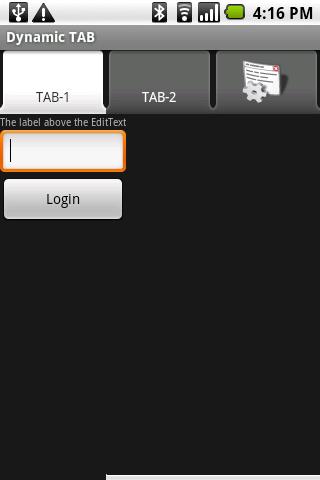
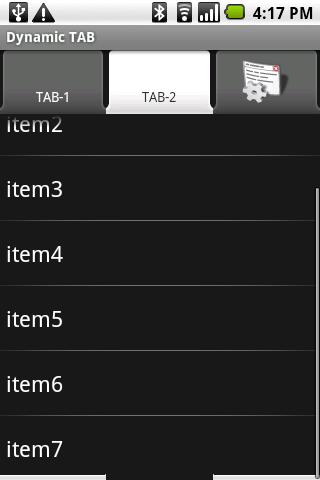
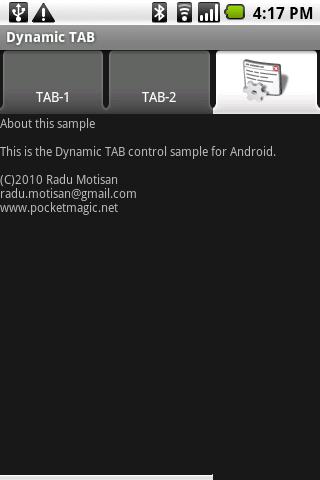
To the first tab I'm adding a panel to hold multiple controls, the second tab a listview with few items, and the third tab gets an icon, and only holds a textView control. All in one the code is as follows:
/** Create the TAB interface */
    private ViewGroup _createTABForm() {
        // construct the TAB Host
        TabHost tabHost = new TabHost(this);
        tabHost.setLayoutParams(
        		new LinearLayout.LayoutParams(
                        LayoutParams.FILL_PARENT, LayoutParams.FILL_PARENT));

        // the tabhost needs a tabwidget, that is a container for the visible tabs
        TabWidget tabWidget = new TabWidget(this);
        tabWidget.setId(android.R.id.tabs);
        tabHost.addView(tabWidget, new LinearLayout.LayoutParams(
                  LayoutParams.FILL_PARENT, LayoutParams.FILL_PARENT));

        // the tabhost needs a frame layout for the views associated with each visible tab
        FrameLayout frameLayout = new FrameLayout(this);
        frameLayout.setId(android.R.id.tabcontent);
        frameLayout.setPadding(0, 65, 0, 0);
        tabHost.addView(frameLayout, new LinearLayout.LayoutParams(
                  LayoutParams.WRAP_CONTENT, LayoutParams.WRAP_CONTENT));

        // setup must be called if you are not initialising the tabhost from XML
        tabHost.setup();

        // create the tabs
        TabSpec ts1 = tabHost.newTabSpec("TAB_TAG_1");
        ts1.setIndicator("TAB-1");
        ts1.setContent(new TabHost.TabContentFactory(){
             public View createTabContent(String tag)
             {
            	 // -- this tab contains multiple control grouped in a panel -- //
             		LinearLayout panel = new LinearLayout(DynTABSample.this);
             		panel.setLayoutParams(new LayoutParams(LayoutParams.FILL_PARENT,
             				LayoutParams.WRAP_CONTENT));
             		panel.setOrientation(LinearLayout.VERTICAL);
             		// Userid : label and text field
             		TextView lblUserid = new TextView(DynTABSample.this);
             		lblUserid.setText("The label above the EditText");
             		lblUserid.setTextSize(TypedValue.COMPLEX_UNIT_SP, 10f);
             		lblUserid.setLayoutParams(new LayoutParams(LayoutParams.FILL_PARENT, LayoutParams.WRAP_CONTENT));

             		EditText ttfUserid = new EditText(DynTABSample.this);
             		ttfUserid.setLayoutParams(new LayoutParams(LayoutParams.FILL_PARENT, LayoutParams.WRAP_CONTENT));

             		// login button
             		final Button btnLogin = new Button(DynTABSample.this);
             		btnLogin.setText("Login");
             		btnLogin.setLayoutParams(new LayoutParams(LayoutParams.FILL_PARENT, LayoutParams.WRAP_CONTENT));
             		btnLogin.setGravity(Gravity.CENTER);
             		btnLogin.setOnClickListener(new View.OnClickListener() {
             			public void onClick(View view) {
             				Log.d("pocketmagic.net", "_createForm click but");
             			}
             		});
             		// 	actually adding the views to the panel
             		// 	userid
             		panel.addView(lblUserid);
             		panel.addView(ttfUserid);
             		// 	loginbutton
             		panel.addView(btnLogin);

             		return panel;
             } //TAB 1 done
        });
        tabHost.addTab(ts1);

        TabSpec ts2 = tabHost.newTabSpec("TAB_TAG_2");
        ts2.setIndicator("TAB-2");
        ts2.setContent(new TabHost.TabContentFactory(){
             public View createTabContent(String tag)
             {
            	 // -- this tab contains a single control - the listview -- //
                 ListView ls1 = new ListView(DynTABSample.this);
                 ArrayAdapter adapter = new ArrayAdapter(
                		 DynTABSample.this,
                		 android.R.layout.simple_list_item_1,
                		 new String[]{"item1","item2","item3","item4","item5","item6","item7"});
                  ls1.setAdapter(adapter);
                  ls1.setOnCreateContextMenuListener(DynTABSample.this);
                  return ls1;
             }
        });
        tabHost.addTab(ts2);

        TabSpec ts3 = tabHost.newTabSpec("TAB_TAG_3");
        ts3.setIndicator(" ");
        ts3.setContent(new TabHost.TabContentFactory(){
             public View createTabContent(String tag)
             {
            	 // -- this tab contains a single control  - a textview -- //
            	 TextView textAbout = new TextView(DynTABSample.this);
            	 textAbout.setText("About this sample\n\nThis is the Dynamic TAB control sample for Android.\n\n(C)2010 Radu Motisan\nradu.motisan@gmail.com\nwww.pocketmagic.net");
            	 textAbout.setTextSize(TypedValue.COMPLEX_UNIT_SP, 12f);
            	 textAbout.setLayoutParams(new LayoutParams(LayoutParams.FILL_PARENT, LayoutParams.WRAP_CONTENT));
            	 return textAbout;
             }
        });
        tabHost.addTab(ts3);
        // -- set the image for tab3, can be used after tab has been created too -- //
        ImageView iv = (ImageView)tabHost.getTabWidget().getChildAt(2).findViewById(android.R.id.icon);
        if (iv != null) iv.setImageDrawable(getResources().getDrawable(R.drawable.icon));

    	return tabHost;
 	}
Click here to download the source code.
Hi i have the tab control name of around 10characters and i have 6 such tabs. Now all the tab control (names)texts are scrolling but i want them to be static and a horizontal scroller for perfect fit of all tabs in the screen. Can u please help me out on this???
Thanks and Regards,
Venkat.
Hi I want to add data dynamically to linear layout when i click on tab.Give me some suggestions
@venkat, can you perhaps put an image showing exactly what you need?
@Praveena: simply create a new LinearLayout, and your controls when you get the TAB click event.
you made my day . your implementation of tabs i the best one i have ever seen, it beats that trivial tabs example at android developer network. I tried to have a listview inside the framelayout, but for some stupid reason, the compiler would not detect it from the main.xml file during build time and gave me errors. i got frustrated coz of this. then i ran into ur example, and added a list view dynamically with a custom adapter that i had made…. and it worked like a charm….
thanks a ton for this awesome article…
@praneet: thank you, I’m glad it helped!
Thank you… finally a real way of making tab content. Everything else is all XML garbage.
Thank you, Matt.
Hi, I have tabs and I am able to set them up properly using xml. I have three tabs basically, one of the tabs when clicked shows a login screen but the problem is when I switch to landscape mode the login page cuts…If I put this inside a scrollview the scrollview is overlapping my tabs and I am unable to see my tabs..To set tabcontent i am using setContent(new Intent()); the approach you followed. let me show you my code.
public class Maestro extends TabActivity {
public void onCreate(Bundle savedInstanceState){
super.onCreate(savedInstanceState);
setContentView(R.layout.maintest);
addTabs();
}
private void addTabs(){
Resources resources = getResources();
//since your using the TabActivity you can simply call this method to
//set up the tabhost make sure to call setup()
TabHost tabs = (TabHost) findViewById(android.R.id.tabhost);
tabs.setup();
//tabspec defines the attributes of the tab
TabSpec tab;
//this creates a new tabspec with an id of quiz
tab = tabs.newTabSpec(“Quiz”);
//this sets the intent/ activity of the tab when pressed
tab.setContent(new Intent(this, Quiz.class));
//this sets the name displayed and the image if you add one
//tab.setIndicator(“Quiz”);
tab.setIndicator(“Quiz”);
//then you add the tab to the tab view
tabs.addTab(tab);
tabs.getTabWidget().getChildAt(0).getLayoutParams().height = 30;
tab = tabs.newTabSpec(“Practice”);
tab.setContent(new Intent(this, Practice.class));
tab.setIndicator(“Practice”);
tabs.addTab(tab);
tabs.getTabWidget().getChildAt(1).getLayoutParams().height = 30;
tab = tabs.newTabSpec(“Win”);
tab.setContent(new Intent(this, AlwaysWin.class));
tab.setIndicator(“Win”);
tabs.addTab(tab);
tabs.getTabWidget().getChildAt(2).getLayoutParams().height = 30;
tab = tabs.newTabSpec(“TestData”);
tab.setContent(new Intent(this, TestScreen.class));
tab.setIndicator(“TestData”);
tabs.addTab(tab);
tabs.getTabWidget().getChildAt(3).getLayoutParams().height = 30;
//sets the current tab
tabs.setCurrentTab(0);
//add the tabhost to the main content view
}
}
PRACTICE.JAVA
public class Practice extends Activity {
public void onCreate(Bundle savedInstanceState){
super.onCreate(savedInstanceState);
setContentView(R.layout.main);
}
}
main.xml has the login page inside a linear layout
Hi,
Nice article 🙂
Can you please tell how to set Content for a current tab ?..
I can able to set content for current tab, but its not changing the view until we change other tab & come back..
Great article…Very helpful
Glad it helped.
Thanks it helped alot..:-)
I’m happy for that.
OMG thank you so much for this! Now I can avoid the XML. Even the Google code examples had bugs. And there is a bug when using the eclipse visual editor with tabs. Is there a way to add a menu at the bottom, for buttons, below the tabhost? Every example seems to say that tabhost must fill the screen. But I’m happy now, thanks again. And thanks for replying to an old post. That’s rare too! 😉
well, I’m glad this helps, I get notifications for your comments so I try to answer.
Regarding your question, what kind of menu are you trying to add? Can you show me a picture to better understand? thanks
I’m not sure how to attach a screenshot on this form. I downloaded an app called ActionComplete from the Android market and I noticed a tab interface with a bar on the bottom with small buttons for other options. Just programming curiosity since I have seen in a few other apps. http://actioncomplete.com/ has screenshots on their page. My apps are unrelated. Just made me go “hmmmmm”. Thanks again!
Hi Radu Motisan,
very nice post.may i know is it possible to have AbsListView instead of ListView.
my application needs a Tab view and a dynamic Listview which can load according to selected tab.and this particular listview should have alphabetic indexer.(is it possible to have the replica layout of Conntact app)
Hello Adhavan,
Did you try changing the ListView for the AbsListView?
The code above is quite flexible.
hi,
Thank u for your reply,motisan.Now it its working fine after changing to AbsListView(i made a mistake).all my Tab got its own ListView and its is working fine.now i have to implement OnItemClickListener for each listView and i am working on that,do u have any idea to do it?.AnyWay Thank You for this tutorial.
You will need to use a different ID for each listview, and check that ID on the click event. Hope this helps.
Thank You Motisan. Its working yahooooo….. u r the only person in my experience to reply for the question (That too, With correct answers)… thank you once again
I’m glad it works!
Is there any way to fix the issue with the white line at the bottom of the screen? I.e. it seems like the white line that should cover the bottom of the inactive tabs is instead placed at the bottom of the screen.
I’m not quite sure what line are you referring to, please upload a picture
I marked the error in the following picture: http://img708.imageshack.us/img708/9393/androidtabcontrol1.jpg
I used your screenshot since it is seen in them too.
@RickardH: I haven’t really looked at the code in that detail but it looks like the content element in the first tab has it’s width set to wrap_content. Try changing that to fill_parent and you should be good to go.
Ie change this:
panel.setLayoutParams(new LayoutParams(LayoutParams.FILL_PARENT,
LayoutParams.WRAP_CONTENT));
To:
panel.setLayoutParams(new LayoutParams(LayoutParams.FILL_PARENT,
LayoutParams.FILL_PARENT));
hey.. dats realy good way to code XML in JAVA…
Thanks Radu… your tutorial is prolly the most useful when it comes to tabs incorporating various ways to display data in tabs, but still i do have a question:
how can i display a custom list inside a tab? A list just like the one in TAB2 in your example but extended with some icons next to the text.
I tried various ways with grid with tables with custom lists, but all fail when i try to create the tab content even if my return type is always a View.
Here are some code parts related to what i’m trying to do:
public class UnitSelector extends Activity {
@Override
public void onCreate(Bundle savedInstanceState) {
[…….]
tab3.setContent(new TabData());
tabs.addTab(tab3);
[…….]
}
class TabData implements TabContentFactory {
private ListView listview;
private ArrayList mListItem;
public View createTabContent(String tag)
{
listview = (ListView) findViewById(R.id.list_view);
mListItem = UnitBO.getUnits();
listview.setAdapter(new ListAdapter(UnitSelector.this, R.id.list_view,
mListItem));
return listview;
}
}
class ListAdapter extends ArrayAdapter {
private ArrayList mList;
public ListAdapter(Context context, int textViewResourceId,
ArrayList list) {
super(context, textViewResourceId, list);
this.mList = list;
}
public View getView(int position, View convertView, ViewGroup parent) {
View view = convertView;
if (view == null) {
LayoutInflater vi = (LayoutInflater) getSystemService(Context.LAYOUT_INFLATER_SERVICE);
view = vi.inflate(R.layout.list_item, null);
}
final UnitBO listItem = mList.get(position);
if (listItem != null) {
((TextView) view.findViewById(R.id.tv_name))
.setText(listItem.getName());
(ImageView) view.findViewById(R.id.icon))
.setImageResource(listItem.getAlerts());
[…….]
return view;
}
}
thanks fred,
You approach is correct:
inside public View createTabContent(String tag) you create your listview, you set its custom adapter, and then you return the listview object. That’s it.
if you need to see how to create a custom listview, please see these two articles:
http://www.pocketmagic.net/?p=1343
http://www.pocketmagic.net/?p=1678
Simply create one of these two complex listviews, and return the object in createTabContent. I did this, it will work with no issue. Still if you get into trouble , let me know.
Fred , I just found an example of a TAB Control with custom listview, ready for you to review and use:
http://www.pocketmagic.net/?p=1398
This is the control interface for a robot. You’ll see the pictures . Code is also available.
Hope this helps.
Hi, I’d like to know how may i edit the content of a list in a tab, with xml there are IDs, but in the way you did i don’t see how to get back the object ListView after the initialization, i thought something like tabHost.getChildAt().getView()
but I don’t find the right methods.
by the way excellent tutorial, it is hard to find tutos explaining how to avoiding xml.
stark0000, thanks, you can define a global handler for your listview , so you can access it at any time.
thanks for answer, I found an easy way to do it with tabHost.getCurrentView() and set tags to Views for externals functions ( view.setTag(“something”); ).
tanks again for this excellent tuto
Hi,thankx for the article.I have a specific requirements. I need to split the screen into two(this part i can do using layout) and have to add two tabs on each part of the screen.Is it impossible to add two tabHost in one screen.
Very useful
Radu,
Great tutorial! This is most likely the best I have seen in a while.
I had a question regarding using commands out of the onCreate command–similar to what stark00000 is asking.
I have a web browser implemented in a tab, but for some reason, it isn’t happy when I call a command outside.
btnLogin.setOnClickListener(new OnClickListener() {
public void onClick(View view) {
openBrowser();
}
});
all that openBrowser does is update the webview.
private void openBrowser() {
wv.getSettings().setJavaScriptEnabled(true);
wv.loadUrl(ttfUserid.getText().toString());
}
In the main code, I simply have panel.addView(wv);
Is there a better way to update?
Appreciate the help.
what error do you get?
the application works until I press the button.
Then it crashes telling me that it has stopped working.
You need to check the Logcat for the actual error. Without it I don’t have any clue on what goes wrong there.
sure thing. It’s on a different computer, so I’ll post it in about 10 hours.
take your time. when you have it post it here, I’m sure it’s a small issue.
-Radu
So the error says that the Source is not found–in reference to the code in openBrowser().
I’m assuming that having a variable outside the command isn’t good enough?
man you are awesome… tut is great….and easy to understand……
thanks…
thanks for your feedback, glad this helped!
Project -> Android 2.2 Tab Layout
http://www.techwavedev.com/?p=14
really good solution
I move the tahHost at bottom by setting tabWidget.setGravity(Gravity.BOTTOM); after tabWidget.setId(android.R.id.tabs); and also set frameLayout.setPadding(0, 0, 0, 65);
Now How can I start new activity using this 3 tabs ?
Please Help.
hello!
I would like to modify this source for the mobile in the landscape mode, but I’m not able! could anybody help me?
Thank you in advance
Hey Mr Radu Motisan!
Thank you so much for uploading this wonderful code!It worked for me!
I’m pretty new to android programming and was figuring how to get a tab done.
Thank you once again and I hope that you can guide me along when I have anything in doubts.
Yours sincerely,
Weng Chiun
Hey Mr Radu Motisan!
I have 2 questions:
1. Is it possible to make 2 tabs with the menu like the 2nd tab with different content?
2. How can I link the “item 1” in tab 2 to another page (html file)?
I look forward for your reply and thank you so much!
Best Regards,
Weng Chiun
Dear Mr Radu Motisan!
Sorry for sending so many mails, but I thought I have to ask this.
May I know how to insert my own icon for the tabs?
I have tried inserting my own png image(search.png) in the drawable folder and did the following changes which after I got an error(it force close the application, after a while it appeared as error in java coding).
// — set the image for tab3, can be used after tab has been created too — //
ImageView iv = (ImageView)tabHost.getTabWidget().getChildAt(2).findViewById(android.R.id.icon);
if (iv != null) iv.setImageDrawable(getResources().getDrawable(R.drawable.search));
Thank you for your patience and I really look forward for your reply as it is rather urgent right here.
Best Regards,
Weng Chiun
Hi!
I would like to function to the menu on Tab 2. Isit possible? can anyone help me ?
Hi!
I would like to add function to the menu on Tab2. can anyone help me?
For example: if i click item1, i can call another java file.
Dear Mr Radu Motisan,
Just to update, I am now able to insert the image, but the sizing of the image doesn’t seem to be perfect. Could you tell me how to resize to the desired size?
Thank you!
Best Regards
after sdk 3.0, create Tabhost with TabHost tabHost = new TabHost(this, null);
hi.. I am using same code but its not working…its giving me Exception of ResourcenNotFound Exception on addTab()
Please can anyone help me.