
To my ATMega8 development board I’ve just added a few more things: a pot for ADC readings (0..255) and a few push-buttons, so I had the idea of quickly writing a simple game. This article is about games and their implementation from electronics up to the software level. As a software developer, I had to keep in mind the limited resources of the ATMega8 but those were more then enough for this application.
The hardware
I’ve used an ATMega8 microcontroller, connected to an 2×16 LCD and three pushbuttons one of which was the MCU reset:
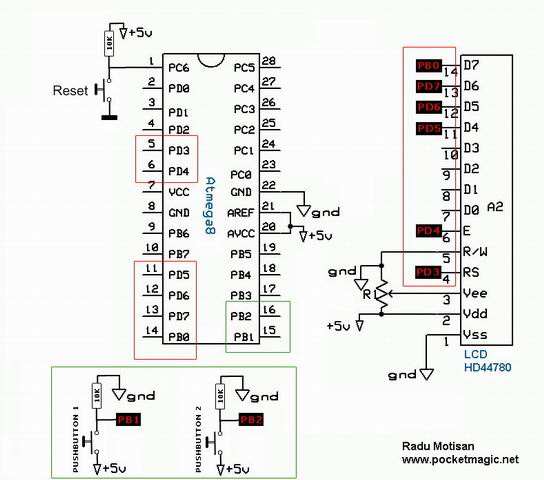
The pins for Pusbhbutton 1 and Pushbutton 2 are connected to Ground through 10k resistors to keep the PIN state LOW. When you press one of these buttons, the PIN receives full VCC (5V) so the PIN state changes to HIGH.
Reset works the opposite way: its state is HIGH by default, and when the user presses the pushbutton, the reset PIN gets grounded and the microcontroller resets.
The LCD is a HD44780 based 2×16 LCD with backlight. Previous articles described the LCD in more detail.
The software
You can download the source code here
A few words on the algorithm:
To optimize the refresh, I’m using a screen buffer of 2×16 characters.
char screenbuffer[2][16];
At each microcontroller tick, I’m putting the content in this buffer then pushing the buffer to the LCD:
lcd_string2("%s\n%s", screenbuffer[0], screenbuffer[1]);
The game displays your character, a little ship represented by the “greater than” character “>” at the left of the screen.
Randomly generated enemies “@” advance from the right side towards your position. The task is to avoid them by moving “UP” to the first LCD line or “DOWN” to the second line using the pushbuttons.
		int but1 = PUSHBUTTON1Status();

		int but2 = PUSHBUTTON2Status();

		f (but1) shipindex = 0;		//move user ship

		if (but2) shipindex = 1;
The enemies are generated randomly, and put in a double queue (for each row):
int enemy[2][16] = {0};

		int rand1 = rand() % 10;

		int rand2 = rand() % 10;

		if (rand1 == 5) enemy[0][15] = 1;	//add new enemy row1

		else

			if (rand2 == 5) enemy[1][15] = 1;	//add new enemy row2

		for(int j=0;j<15;j++)	//add enemy to screen buffer
		{
			if (enemy[0][j]) screenbuffer[0][j] = '@';
			if (enemy[1][j]) screenbuffer[1][j] = '@';
		}
and are advancing to the left at each microcontroller tick:
for (int j=0;j<15;j++)
		{
			if (enemy[0][j+1]) { enemy[0][j] = 1; enemy[0][j+1] = 0; }	//advance row1
			if (enemy[1][j+1]) { enemy[1][j] = 1; enemy[1][j+1] = 0; }	//advance row2
		}
You loose when an enemy hits your ship:
f (enemy[0][0])
{
if (shipindex == 0) //you are on the first line like the enemy
{
lcd_clrscr();
lcd_string2("OUCH-GAME OVER\n press RESET ");
return 1;
}
enemy[0][0] = 0; //remove left position enemy
}
if (enemy[1][0])
{
if (shipindex == 1)
{
lcd_clrscr();
lcd_string2("OUCH-GAME OVER\n press RESET ");
return 1;
}
enemy[1][0] = 0; //remove left position enemy
}
What we're doing here is to check if the enemy coordinate matches your ship's and exit the program with a "You lost" message, or delete the enemies on the first row from the buffer:
enemy[0][0] = 0; //remove left position enemy
Each microcontroller tick is counted, and this number also represents the total frames drawn, and your score. Manage to survive until 99 points to win this game.
if (i==99)

		{

			lcd_clrscr();

			lcd_string2("    YOU WON!   \n  press RESET  ");

			return 1;

		}
There's a delay that sets the difficulty:
		//some delay

		delay_us(300000);
This value changes the animation speed, so the enemies will advance faster or slower towards your position. You could upgrade this game and add levels instead of terminating the program at 99 points: each new level sets a lower frame delay, so the animation is faster (and the game harder) as you advance through levels.
Enjoy!
can anyone tell where exactly it is? tks
Where there in the source code archive Game files? I find sj many librarys but i have not interrested in that libraries. Please make archive with files dedicated only for this project. Thnx
the code is available here:
http://www.pocketmagic.net/wp-content/uploads/2009/10/lcd_2x16_board_game.zip
Hey Radu Motisan. I’m working on a similar LCD game. And for some reason my code is not working properly. I wanted to test your code but the link given by you is not working. Is there any chance you could mail the code to me or perhaps mention a new working link.
Thanks.
I just tried the link and it is working fine.